If you are a foreigner planning a trip or stay in China, understanding the mobile payment landscape is the single most important step for a smooth journey. The country is overwhelmingly digital, making cash practically obsolete for daily transactions. Alipay is one of the most popular and foreigner-friendly options. This comprehensive, step-by-step guide will walk you through setting up your international account, linking foreign credit cards (Visa, Mastercard, etc.), mastering payment methods, and utilizing essential mini-programs for public transit and daily life.
The Quick Answer for Using Alipay in China
-
Can foreigners use Alipay? Yes! You can now download the international version of Alipay and link your foreign Visa, Mastercard, JCB, or Discover card directly.
-
Do I need a Chinese Bank Account? No. You do not need a Chinese bank account or a Chinese phone number to register.
-
Are there fees? Transactions under 200 RMB (approx. $28 USD) have no Alipay transaction fees. Transactions over 200 RMB incur a 3% fee.
-
What else does it do? Beyond payments, you will use Alipay’s "Mini-Programs" to scan subway gates, hail DiDi taxis, and rent shared bikes.
I. The Cashless Reality: Why Do You Need Alipay?
While cash is technically legal, the reality is that the vast majority of transactions—from purchasing a bottle of water to paying a taxi fare—are conducted via mobile payment platforms. Many local vendors (especially small shops and street food stalls) are not equipped to handle physical currency or international credit cards. Trying to rely on cash in China can quickly lead to inconvenience and missed opportunities.
Essential Scenarios Requiring Alipay
To move, eat, and shop like a local, you need mobile payment access for:
-
Street Food Vendors & Small Shops: The backbone of Chinese commerce often relies solely on QR code payments.
-
Public Transport: Most major cities require scanning a digital Ride Code on your phone to board buses or enter subway stations.
-
Ride-Hailing Services: Apps like Didi are exclusively integrated with mobile payment systems.
-
Shared Services: Renting shared bicycles or charging power banks requires in-app payment authorization.
-
Booking Tickets: Reserving admission to attractions or events is frequently managed through Alipay’s built-in Mini-Programs.
II. Step-by-Step Instructions to Set Up: Linking Your International Card
The good news is that Alipay has significantly simplified its setup process for international tourists, allowing you to link your home country's bank card directly and offers English-language interface.
Crucial Pre-Travel Advice: Download and register the app before arriving in China. This ensures you can receive SMS verification codes using your primary phone number without worrying about local SIM card activation or Wi-Fi issues.
Step 1: Download & Registration

-
Download the official "Alipay" app from the App Store or Google Play and create an account with Alipay. Ensure to download the latest version.
-
Open the app and tap 'Sign Up'. Select the option for 'International User'.
-
Enter your International Phone Number (select your correct country code and ensure it works in China for SMS verification)
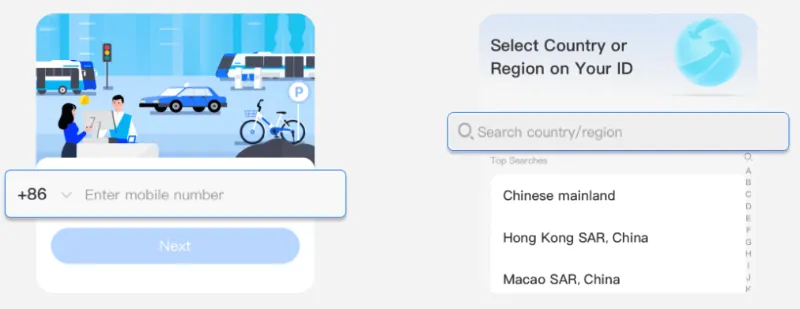
4. Complete the initial SMS verification code process.
Step 2: Identity Verification (Passport Upload)
To unlock the full functionality and higher spending limits, identity verification is mandatory.
-
Navigate to Me > Settings > Account & Security > Identity Verification.
-
Upload clear photos of your valid Passport and fill in all required personal details.
-
Alipay reviews this information; this process usually takes just a few minutes, but can sometimes take longer.
-
Note: Verification is essential to unlock higher transaction limits (up to $50,000 USD annually).
-
Step 3: Linking Your International Bank Card (The Primary Method)
This is the fastest and most convenient method for most tourists.
-
On the homepage you can tap "add now", or go to Me > Bank Cards and tap the '+' icon in the corner.
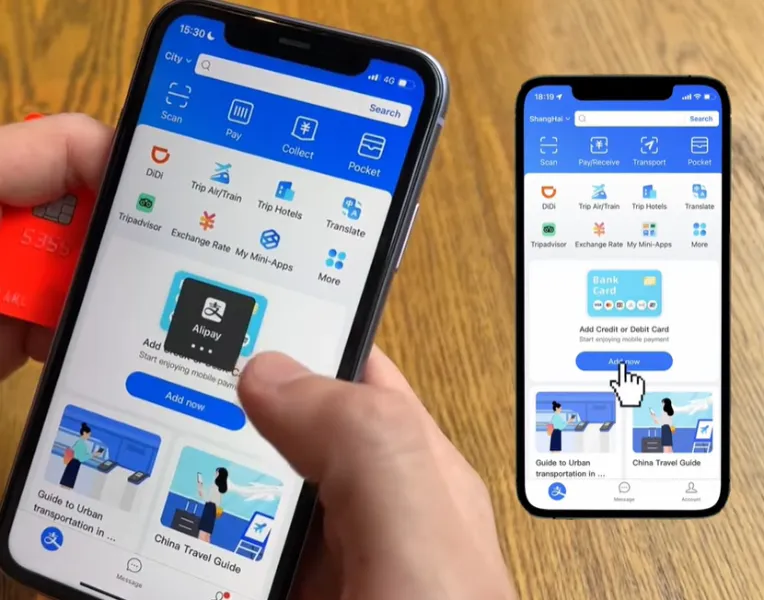
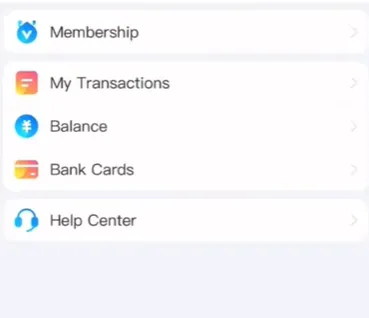 Image from Alipay Youtube, Copyright by original author
 -
Enter your card number. You can link all types of bank cards including Visa, Mastercard, JCB, Discover, and Diners Club International.
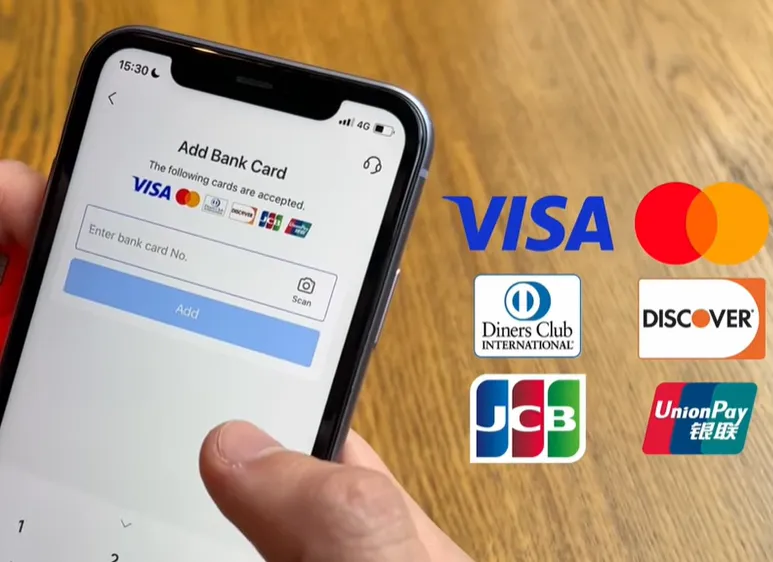 Image from Alipay Youtube, Copyright by original author
 -
Complete the bank's security verification process (often a one-time password or OTP sent to your phone).
-
Key Feature: Your international card is now linked. When you pay, Alipay converts the RMB amount to your home currency, and the transaction is deducted directly from your foreign card.
Alternative Option: The TourCard (If Applicable)
While direct card linkage is superior, the TourCard (also referred to as Tour Pass or TourCard in some contexts, a prepaid service provided by the Bank of Shanghai) serves as a necessary backup if a payment is unexpectedly declined.
- What's TourCard: It allows you to top up funds from an international bank card (like Visa, Mastercard, JCB, Diners Club, or Discover) and use the balance for seamless mobile payments via the Alipay app, where cash and foreign credit cards are often not accepted.
-
When to Use It: If you frequently encounter small, older terminals that fail to process your direct foreign card payment, using the TourCard's RMB balance may offer greater acceptance.
-
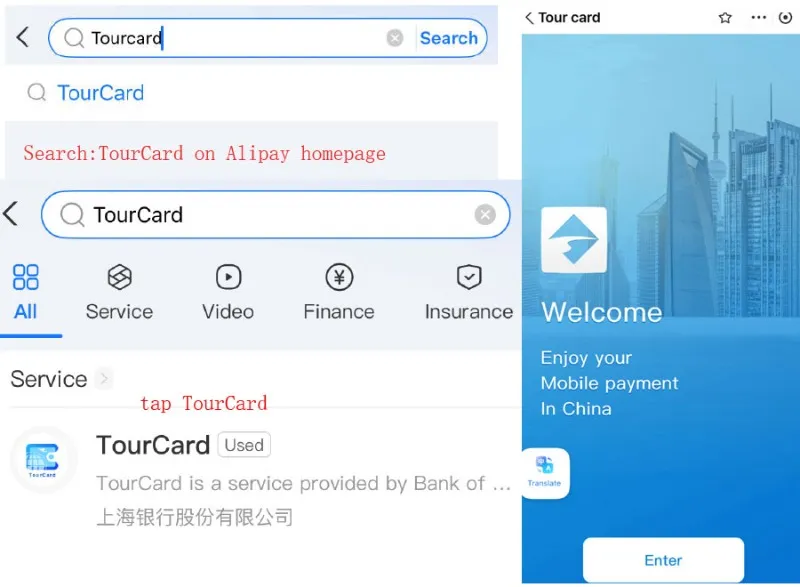
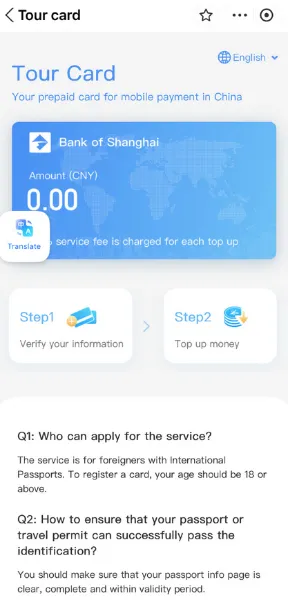
Process: Search for the "TourCard" Mini-Program on Alipay homepage. Follow the steps to load funds from your international card into the prepaid account: Step 1 verify your information; Step 2 top up money; Step 3 use QR code to pay.
-
Prepaid Balance: Funds are converted from your international card to RMB (Chinese Yuan) upon top-up, with automatic exchange rates handled by the Bank of Shanghai. This avoids carrying cash or dealing with high foreign transaction fees from direct card use.
-
Restrictions: No support for peer-to-peer transfers, red packets, financial investments, or withdrawals. Some apps/services (e.g., food delivery via Meituan) may still require additional verification.
- ⚠️ Caution: TourCard transactions typically incur a potential 5% top-up fee and the balance expires after 365 days. Always try the direct card linkage first. Top-up limits: Up to ¥15,000 (~$2,000 USD) without ID verification; higher amounts require passport verification. Its single transaction limit is RMB 5000.
III. How to Pay & Transaction Types
Now you're all set to start paying like a local. There are two ways to make payment in person depending on the merchant. One Way is to scan the merchant's Alipay QR code or the other way is to present your personal payment code for the merchant to scan you. For your protection, this code is generated for one-time use only.
1. Scan-to-Pay (Scanning the Merchant's Code)
-
This is common at larger stores, restaurants, and cashier counters.
-
Tap 'Scan' on the Alipay homepage.
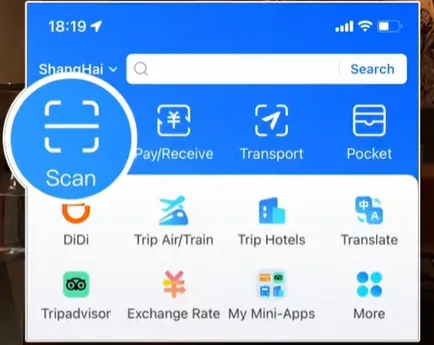 Image from Alipay Youtube, Copyright by original author
 -
Scan the vendor's static or printed QR code.
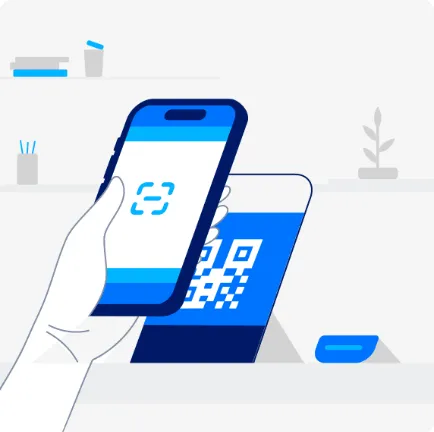 Image from Alipay+, Copyright by original author
 -
The app will prompt you to manually enter the amount owed.
-
Review the amount and confirm the payment.
2. Show-to-Pay (The Merchant Scans Your Code)
-
This is the fastest method, frequently used at convenience stores, taxis, and high-volume retail.
-
Tap 'Pay/Collect' on the Alipay homepage to generate your unique, rotating Payment Code.
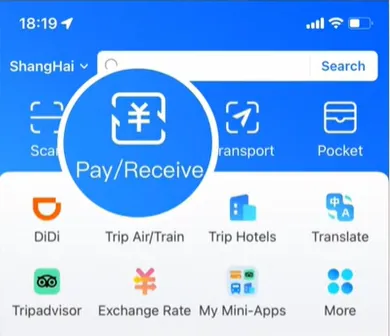
-
The vendor scans this code using their device.
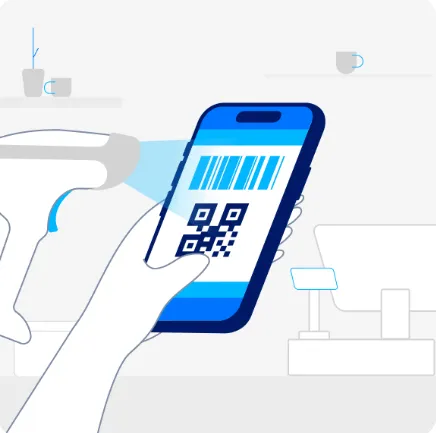 Image from Alipay+, Copyright by original author
 -
The transaction is automatically processed and deducted from your linked foreign card.
IV. Alipay for Transit, Travel & Convenience
Alipay’s strength lies in its ecosystem of Mini-Programs, which integrate vital local services into the payment app. One of the best features of Alipay is its built-in transportation tools.


1. Public Transit (Bus & Metro)
Forget buying physical tickets; digital transit is mandatory in major Chinese cities.
-
Search for 'Transport' or 'Ride Code' on the homepage.
-
You must Activate the specific transit code for the city you are in (e.g., 'Shanghai Metro Pass').
-
Use the generated QR code to scan the reader at the bus or subway turnstile.
-
System Feature: This is a 'pay-after-you-ride' system, meaning the fare is calculated and charged to your linked card only after you exit the transport.
-
Step 1: open Alipay and tap "Transport"
Step 2: select "Metro", tap the "Get Now" button and generate the ride code
Step 3: At subway gate, scan the ride code at the scanner.
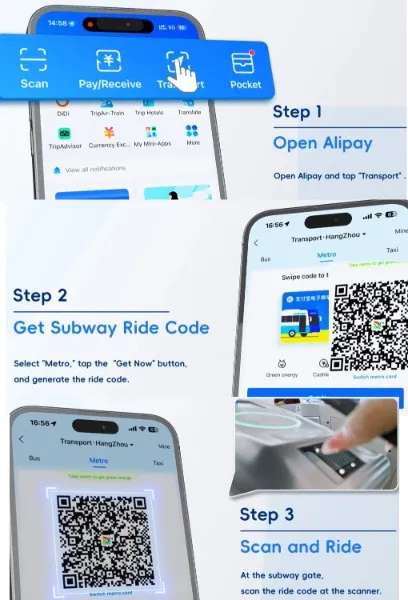
You can also use the same method to take the bus: select the BUS option next to Metro, then generate a transit code and scan it on the bus to pay your fare.
Step 1: open Alipay and tap "Transport"
Step 2: select "Bus", tap the "Get Now" button and generate the ride code
Step 3: On the bus, scan the ride code at the scanner, a beep indicates a successful scan.
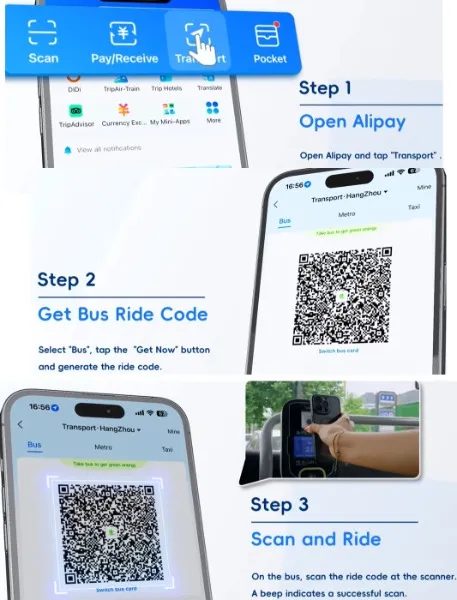
2. Ride-Hailing & Navigation
Didi is a Chinese ride-hailing app. You can use it within Alipay.
Before using the DiDi mini-program in Alipay, ensure:
①Alipay app installed and registered
②Your Alipay account is linked to a payment method, such as an international card (Visa/Mastercard) or the Tour Card for seamless RMB transactions.
③ Location services are enabled on your phone for accurate pickup detection.
How to use?
-
Access the DiDi Mini-Program: On the homepage, look for the "DiDi" icon in the "More" or "All Services" section → If not visible tap the search bar at the top (magnifying glass icon) and type "DiDi" → Select the official mini-program from the results. Grant location permissions when prompted (tap "Allow") to detect your current position.
-
Book a Ride:
Step1: Open Alipay, tap "Didi" on the homepage.
Step2: Enter your start and end points, choose the vehiche type, tap "Confirm Request". and wait for the driver to accept the order.
Step3: After the trip, the fare is automatically deducted via Alipay. Passengers can simply get off. You can pay later by reopening the mini-program if needed. 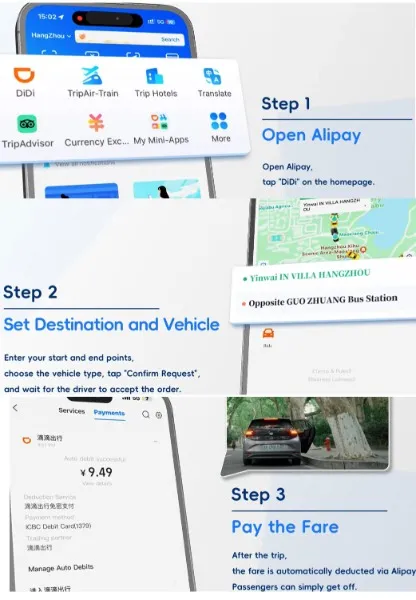
3. Shared-bikes
You also can use Alipay to rent a shared bike and ride.
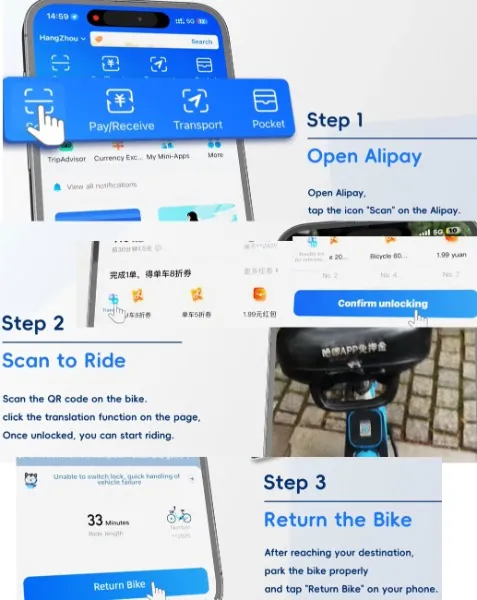
How to use Hellobike mini-program (blue color bike) within Alipay? You also can access to others like Meituan yellow and Qingju green via mini-programs.
Step1: Open Alipay, tap the icon "Scan" on the Alipay.
Step2: Scan the QR code on the bike, click the translation function on the page. Once unlocked, you can start riding.
Step3: After reaching your destination, park the bike properly, and tap "Return Bike" on your phone.
4. Other Useful Features
-
In-app Translation: Helps communicate with drivers or shopkeepers in real-time.
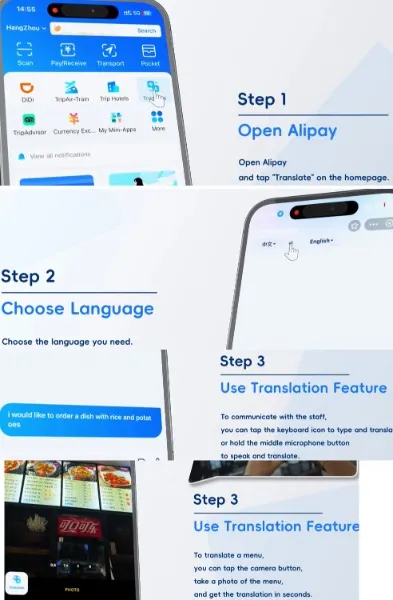 Image from Alipay Youtube, Copyright by original authorIf Translate is not visible on the homepage, then tap the search bar at the top (magnifying glass icon) and type "Translate"
 -
Currency Converter: Allows quick verification of the payment amount in your home currency before confirming a transaction.
- Buy Plane & Train Tickets, Tourist Passes, and Book Hotels via Trip.com Mini-Program
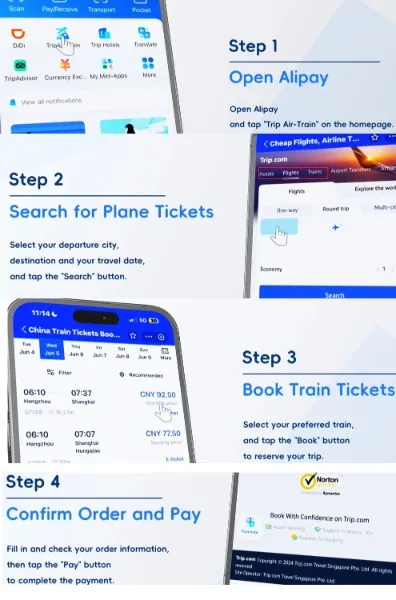 Image from Alipay Youtube, Copyright by original author
V. Fees & Transaction Limits (Critical Information)
Understanding the fee structure is vital for maximizing value while using Alipay as a foreigner.
1. Transaction Fees
-
Transactions ≤ ¥200 CNY (approx. $28 USD): NO Fee. Small, daily purchases are free of charge, encouraging widespread use.
-
Transactions > ¥200 CNY: A 3% Fee is charged only on the portion of the amount that exceeds ¥200 CNY.
- How to Avoid: Always pay in RMB (the local currency) to avoid a bad exchange rate.
2. Transaction Limits (As of 2025)
Alipay has significantly increased limits for verified international users:
-
Single Transaction Limit: Up to approximately $5,000 USD.
-
Annual Cumulative Limit: Up to approximately $50,000 USD (Requires full passport verification).
💡 Pro Tip: How to Avoid the 3% Alipay Fee
Because the 3% fee only applies to single transactions over ¥200 CNY, savvy travelers often ask merchants to split larger bills. For example, if your restaurant bill is ¥350 CNY, you can ask the waiter to split the payment into two separate transactions of ¥175 CNY. Since both transactions are under the ¥200 threshold, you will legally avoid the 3% Alipay surcharge! (Note: Your home bank may still charge a standard foreign transaction fee depending on your credit card policy).
VI. Is Alipay Safe?
Alipay is built on robust financial infrastructure, offering bank-level security for all transactions.
-
Bank-Level Security: Alipay employs end-to-end encryption, fraud monitoring, and two-factor authentication to protect your account.
-
Privacy Assured: Your linked credit card details are not shared directly with the merchants you are paying.
-
Common Sense: As with any payment platform, never share your verification codes, and be cautious when using the app on unsecured public Wi-Fi networks.
Alipay is more than just a payment app; it is the key to unlocking a seamless and efficient experience in modern China. By following these straightforward steps—from linking your international Visa or Mastercard to activating city-specific transit codes—you are now fully equipped to navigate the world's most dynamic cashless society. Forget the stress of searching for ATMs or fumbling with small change. With Alipay configured, you can move, shop, and explore just like a local. Download the app, complete your verification, and enjoy the convenience of a truly modern travel experience.
VII. Frequently Asked Questions (FAQ)
|
Question |
Answer |
|---|---|
|
Q: Do I need a Chinese SIM card or phone number? |
A: No. You can successfully register and use Alipay with your international mobile number. In fact, it is recommended to register before you travel. |
|
Q: Can I transfer money to a Chinese friend? |
A: No. For security and regulatory reasons, international Alipay accounts do not support domestic money transfers or sending funds to local Chinese users. |
|
Q: Will my payment be declined at small vendors? |
A: Direct foreign card linkage works almost everywhere now. If a payment is declined, try asking the vendor if they accept cash, or use the TourCard balance as a last resort. |
|
Q: Why do I need to verify my passport? |
A: Identity verification is mandatory under Chinese financial regulations and is required to unlock higher spending limits and full platform features. |
|
Q: Do I need a VPN to use Alipay in China? |
A: No. Alipay operates normally on the Chinese internet without the need for a Virtual Private Network. |
|
Q: What happens when my Tour Pass expires? |
A: Your balance will be refunded automatically to your original payment card. |
|
Q: Can I top up Tour Pass with PayPal or cash? |
A: No. Only international bank cards (Visa, Mastercard, etc.) are supported. |
Useful Tips for Travelers
-
✅ Complete registration before your trip (some foreign app stores block downloads in China).
-
✅ Always keep your app updated for security.
-
✅ Keep some cash (about 300–500 RMB) as backup for emergencies.
-
✅ Install both Alipay and WeChat Pay for maximum flexibility.
-
✅ Avoid using Alipay on public Wi-Fi for large transactions.