Quick Facts About Using WeChat in China
- Do I need it? Yes. WeChat is essential for paying at stores, scanning menus, booking train tickets, and communicating.
-
Can I use a foreign credit card? Yes! You can now link international Visa, Mastercard, Discover, and JCB cards directly to WeChat Pay.
-
Do I need a Chinese phone number? No. You can register and use WeChat with your home country's phone number.
-
Is there an English version? Yes. You can switch the entire app interface to English, and there is a built-in translation tool for messages and photos.
When you arrive in China, one thing becomes clear almost immediately — life here runs on WeChat. From paying for noodles at a street stall to booking flights, chatting with friends, or hailing a taxi, WeChat is the all-in-one tool that locals (and increasingly, foreigners) can’t live without.
If you’re new to China, this guide will walk you step-by-step through how to set up and use WeChat, activate payments, travel around the country, and make the most of its powerful features — safely and easily.
Part 1: What Is WeChat?
WeChat — or Weixin (微信) in Chinese — is much more than a messaging app. Developed by Tencent, it’s a super app that combines social networking, mobile payments, transportation, e-commerce, and government services in one platform.
For most Chinese people, WeChat replaces a phone number, a wallet, and even a bank card. It’s how people send money, check news, and connect with businesses. In many cities, you can go an entire week without touching physical cash — everything happens through WeChat Pay.
Main features include:
-
Messaging and Calls: Text, voice, and video chats with individuals or groups.
-
WeChat Moments: A social feed for sharing photos, updates, and links.
-
WeChat Pay: An integrated wallet for paying bills, shopping, and transfers.
-
Mini Programs: Built-in “sub-apps” for transport, shopping, dining, and travel.
-
Official Accounts: Follow businesses, embassies, or media for updates.
In short, WeChat is your digital Swiss Army knife for life in China.
Part 2: WeChat Setup for Foreigners: Downloading and Setting Up WeChat
The sign-up can be tricky, but once you're in, you're golden. This WeChat registration guide will walk you through the hurdles.
2.1 Download, Signup & Verification

Download @ Google Play (Android) or Apple Store (IOS)
Signup & Verification: Sign up → Set up your Profile → Add Friends → Change Language
After installing WeChat, you can sign up for an account through the following methods:
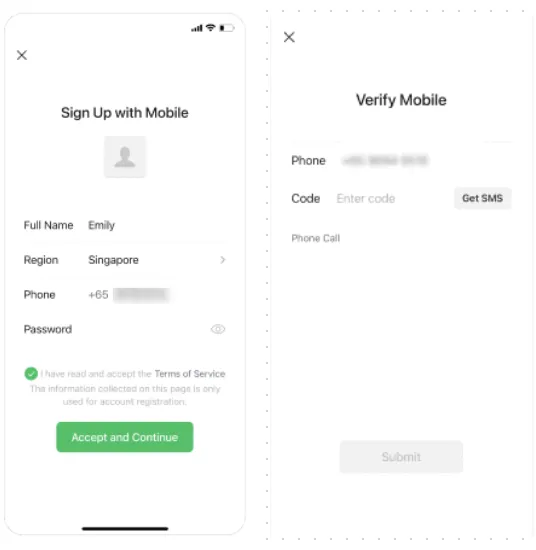
💡 Troubleshooting: The "Security Verification" QR Code New foreign accounts are often blocked by a security screen asking an existing WeChat user to scan a QR code to verify them.
-
The Fix: You must find someone who has had an active WeChat account for over 6 months and has not verified anyone else recently. Ask a colleague, a Chinese friend, or even your hotel concierge to scan your code.
-
Alternative: If you are prompted, try the "Verify via Payment Card" option instead, which bypasses the need for a friend.
2.2 Quick Fixes: Essential Language and Account Settings
Profile: You can personalize your display name and profile photo later under “Me → Settings → Profile.”
Language: Head to Settings > General > Language and switch the interface to English
2.3 Your Translation Lifeline: Mastering WeChat’s Scan & Chat Translation
This is, arguably, the most important feature for daily communication and navigation in China. Don't leave home without knowing these two tools:
-
In-Chat Real-Time Translation:
-
When a friend or your tour guide sends you a message in Chinese, simply long-press the message bubble and tap Translate.
-
Pro-Tip: This is your savior for understanding complex instructions or messages without ever leaving the conversation.
-
-
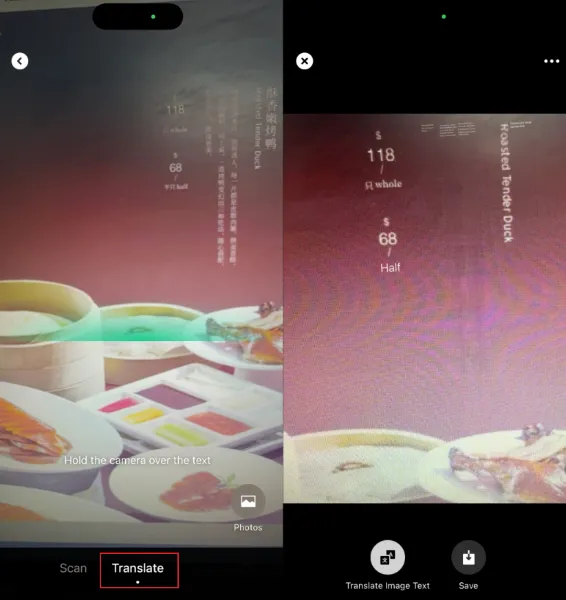
Visual Translation (The Magic Scanner):
-
This feature allows you to translate written Chinese text in the real world—perfect for reading menus, signs, and product labels!
-
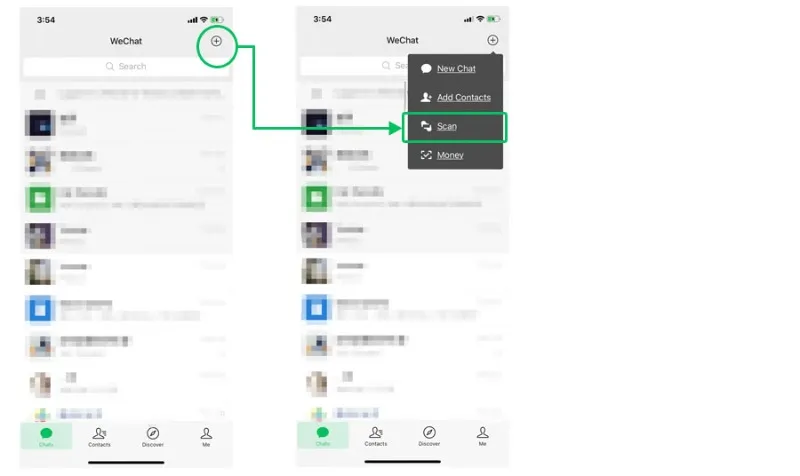
How to Use: Tap the + icon (top right) → Tap Scan (扫一扫) → Tap Translate (翻译) at the bottom.
-
The Power: Point your phone camera at any Chinese text (a restaurant menu, a subway poster, a packaging label), and WeChat will instantly overlay the English translation onto the image on your screen. This tool will save you hundreds of hours of head-scratching!
-
Part 3: Linking Foreign Cards to WeChat Pay: Security and Real-Name Verification (RNV)
This is the big one. Getting your WeChat Pay setup correctly is the most empowering step for any foreigner in China.
3.1 Security First: The Real-Name Rule
-
Is it Safe? Absolutely! Every payment is protected by your secure 6-digit Payment Password.
-
Real Name, Real Money (RNV): To unlock your digital wallet and access WeChat Pay, you must complete Real-Name Verification (RNV), usually by uploading your passport details. Without RNV, using WeChat Pay in China is not possible.
3.2 Step-by-Step Guide: Linking Your International Bank Card and Real-Name Verification
Step 1: Open WeChat → Me → Pay and Services → WalletStep 2: Select Bank Cards → Tap Add a New Card and input your 6-digit Payment Password (if set) (you can link all types of bank cards including Visa, Mastercard, JCB, Discover and more, but functions may be limited to online purchases or small in-app payments). Read the Weixin Pay User Service Agreement and Privacy Policy and tap Agree. Follow the steps on the screen to fill in your identity information. Tap Next to add your card. Follow the instructions on the screen to complete the process.
Step 3: Enter card information
Step 4: Wait for SMS verification code
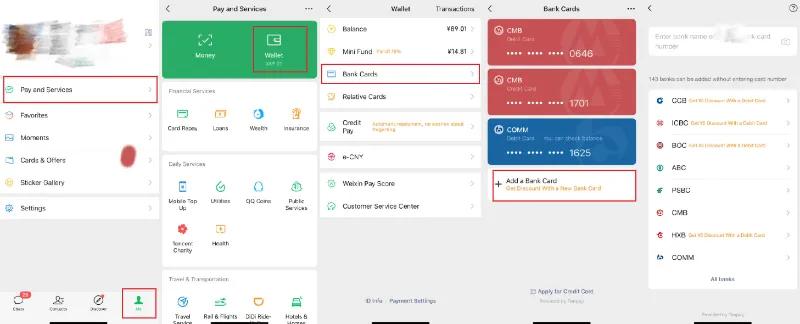
Step 5: real-name verification. The system will ask for your Name, Passport Number, and Nationality. Enter your name exactly as it appears on your passport and the bank’s records. You may need to upload a photo of your passport (Real-Name Verification).
Troubleshooting
-
If linking fails, double-check that your name matches your passport.
-
Try another bank — some banks support foreign cardholders better than others.
-
If your WeChat language is English, temporarily switch to Chinese; some users report smoother verification that way.
Part 4: How to Use WeChat Pay: Scanning, Transfers, and Red Packets
Once your wallet is active, you can pay virtually anywhere in China. Here are the most common methods:
4.1 Step-by-Step Guide: Paying a Merchant Using Scan Codes
- Scan to Pay
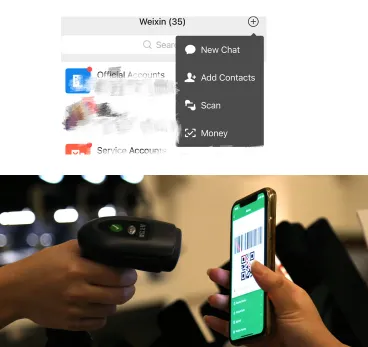
At stores, restaurants, or markets: Tap the "+" → “Scan” button to scan the merchant’s QR code → Confirm the amount and enter your payment password
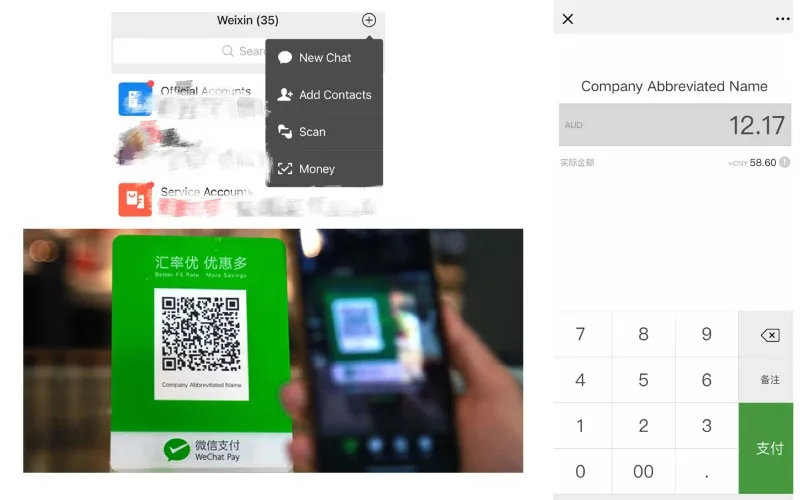
02. They Scan You (Passive Scan)
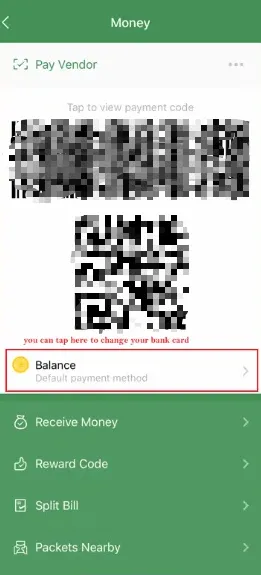
Tap the "+" → “Money" → Show your payment QR code to merchant or cashier → they will use their scanner to read the code → Payment is automatically deducted from your primary payment method.
03. In-App Payments
Users make purchases in merchant apps using WeChat Pay. When using other apps like Meituan (food delivery), Ele.me, or Didi (ride-hailing), Trip.com (flights, hotels, train tickets) choose WeChat Pay at checkout — payment happens instantly within WeChat.
04. Mini Program Payment
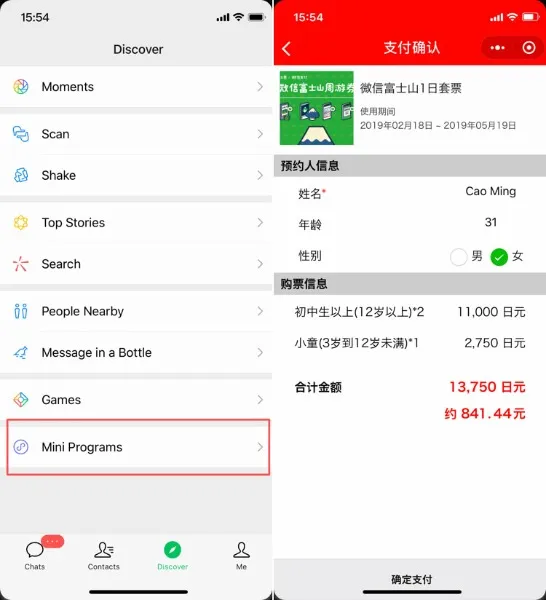
Users pay for goods or services in Mini Programs created inside WeChat. WeChat users open the merchant's Mini Program, place an order, enter their payment password to complete the payment, and then return to the merchant's Mini Program.
User payment flows:
User opens a Mini Program in WeChat and selects product(s) > User comfirms shopping cart (optional) > User in taken to the payment screen and enters payment password to confirm the transaction > Payment is completed and confirmation sent to the merchant and user.
05. Web Payment
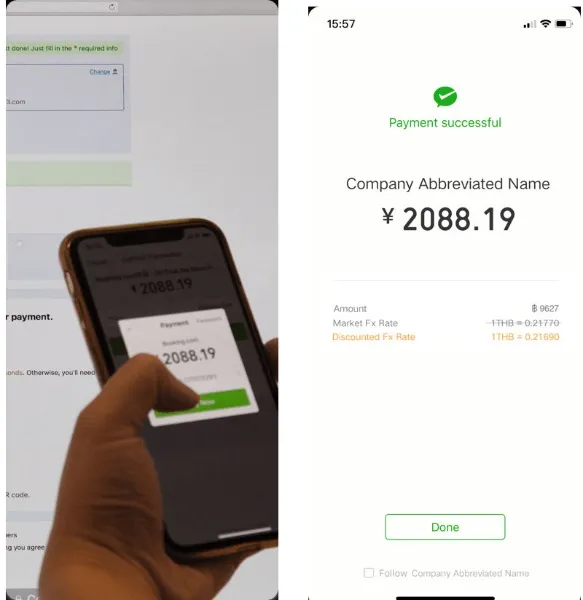
Users use Wechat's "Scan" feature to scan a payment code generated by a merchant on a web page to make a payment. "Web payments allows order information to be embedded in a unique QR code. By scanning the code in WeChat, users complete the payment after passing the security checks.
User payment flows:
User goes to 'Scan QR code' in WeChat and scans merchan's QR Code and enters payment password to confirm the transaction. > Payment is completed and confirmation sent to the merchant and user.
4.2 Social Money: Transfers and Red Packets
-
Transfers (转账): For person-to-person payments, tap + > Transfer in the chat.
-
Red Packets (红包, Hóngbāo): Digital gift envelopes, typically capped at small amounts.
- Use “Split Bill” in group chats for easy cost sharing.
Tips: International cards do not support certain features such as send red packets and money transfers etc.
Part 5: WeChat for Public Transit
WeChat can handle nearly all your transportation needs in China. The Transit QR Code supports mobile payments for intelligent transportation services such as Bus Rapid Transit (BRT), public transport, metro, cableways, ferries and more. It is available in more than 130 cities in mainland China.
Step-by-Step Guide: Setting Up the Public Transit QR Code
This method works on both metro and bus for lots of cities in China.
Step 1: search for local transit.
In the WeChat search bar, search for your city's transit app (e.g., "Shanghai Metro", "Chengdu Bus") > Select the official Mini-Program or Official Account.
Step 2: Access the QR Code Function.
Inside the Mini-Program, look for the option labeled Code (乘车码) or Ride Code.
Step 3: Agree to Terms/Activate.
You will be prompted to agree to a user agreement and potentially complete a one-time identity verification.
Step 4: Link WeChat Pay
The Mini-Program will ask for permission to deduct funds automatically from your WeChat Pay account. Tap Authorize or Confirm.
Step 5: Generate and Use
The dynamic QR code is now ready. Open this Mini-Program when you reach the subway gate, scan the code, and walk through!
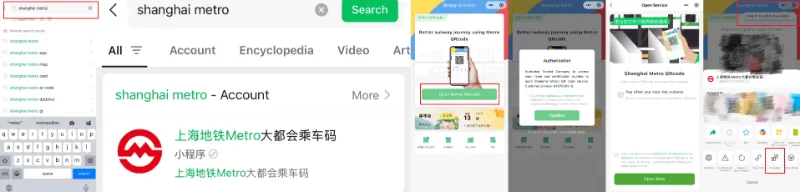
You can click ••• to add to my program. Then pull down on WeChat homepage and you will find this mini program next time.
Part 6: Best WeChat Mini-Programs for Travel and Daily Services
Mini-Programs are lightweight, instant apps built into WeChat.
6.1 Ride-Hailing
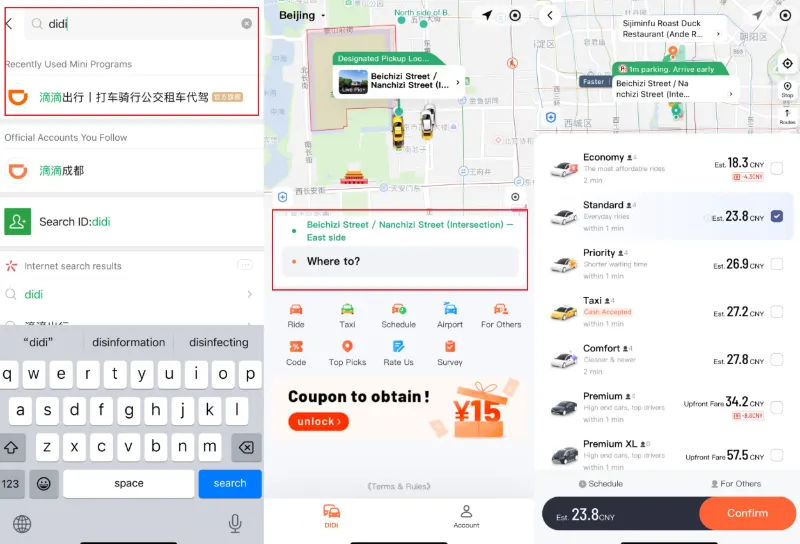
WeChat integrates with Didi, Amap (Gaode), and T3 Go mini programs:
Step 1: tap the search bar at the top (magnifying glass icon) and type "Didi" (it may redirect to Chinese "滴滴出行") Mini-Program on WeChat homepage
Step 2: On first open, allow access to your location. If prompted, switch the language to English in the top-right settings gear icon.
Step 3: Your pickup location auto-fills based on GPS (double-check the pin for accuracy, e.g., "Exit B of the airport") and then tap the destination field and enter it in English/Pinyin (e.g., "Beijing Railway Station") or drop a pin on the map.
Step 4: Select Ride Type
Step 5: Confirm and Book: Review the fare estimate, then tap "Confirm" or "Book Now." Payment deducts automatically from WeChat Pay. Step 6: You'll see the driver's name, photo, car model, license plate, and ETA—screenshot this > Track the car on the map. The driver might call or message (use in-app auto-translate for chat) > At pickup, show the plate number; they may ask for the last 4 digits of your phone number as a security code.
6.2 Shared Bikes
Below is a step-by-step guide for foreigners to use shared bikes in China via WeChat Mini Program (no Chinese ID or phone number required). This works for major brands like Meituan Bike (美团单车), HelloBike (哈啰单车), and Qingju (青桔单车) — all accessible inside WeChat.

Step 1: Tap the search bar at the top (magnifying glass icon) and search for the bike brands: Meituan Bike: Search 美团单车 or Meituan Bike or HelloBike: Search 哈啰出行 or HelloBike or Qingju: Search 青桔单车 or Qingju Mini-Program on WeChat homepage
Step 2: Use translate function turning page into English
Step 3: Allow location accress and camera access ( to scan QR codes)
Step 4: Tap scan to unlock or scan QR > Point camera at the QR code on the bike (usually on handlebar or rear mudguard) > Bike unlocks with a beep and "ding" sound. Ride fee (¥1.5–¥3 per 30 mins).
Step 5: When you arrive at your destination, lock the bike via mini program. Only park in white bike parking zones (look for bike icons on sidewalk).
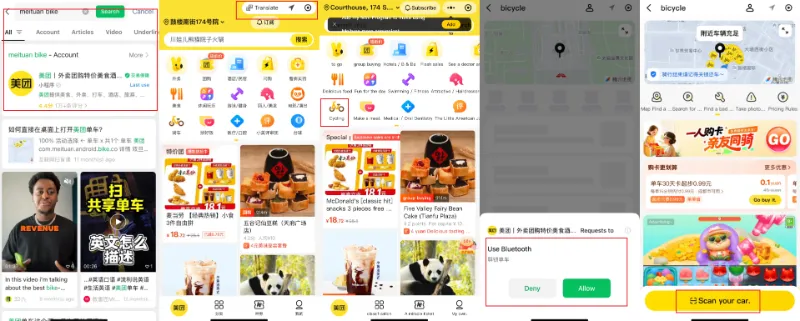
You can tap ••• to add to my program for quick access next time. It's now pinned under "Me" > "Favorites" or directly in Mini Programs.
6.3 Train, Hotel and Flight Bookings
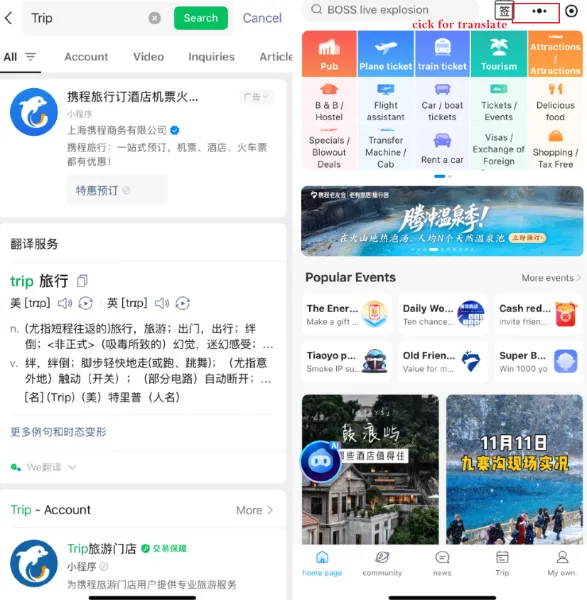
Use mini programs like 12306 (China Railway), Ctrip (Trip.com), or Fliggy to search routes, book seats, and pay instantly. Your e-ticket is automatically linked to your passport or ID. I recommend Trip.com (携程) mini program because its English interface, foreign cards payment friendly and no Chinese ID required.
Step 1: tap the search bar at the top (magnifying glass icon) and type "Trip" Mini-Program on WeChat homepage
Step 2: Use translate function turning page into English
Step 3: tap service you need and pay with WeChat pay
6.4 Food Delivery
Recommended Food Delivery Mini Programs: Meituan (Yellow) and Ele.me (Blue)
Step 1: tap the search bar at the top (magnifying glass icon) and type "Meituan" Mini-Program on WeChat homepage
Step 2: Allow location access
Step 3: Tap right corner → translate into English
Step 4: Tap the top left corner and set address (Option A: Let GPS auto-detect (accurate in cities); Option B: Paste Chinese address (from hotel card or map)) → add detailed info: Building, Floor, Room (e.g., A座15楼1502室)
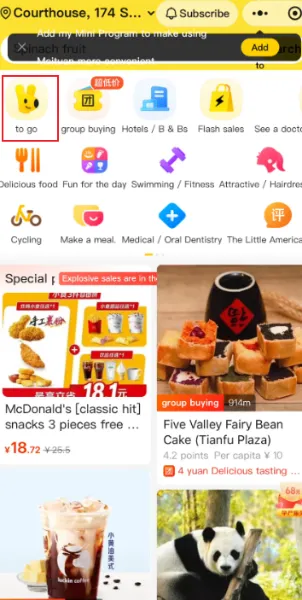
Step 5: Tap "To Go" and order what you want.
Part 7: Social and Real-Time Location Sharing
7.1 Messaging and group chats
Send texts, voice messages, photos, files, and even short videos. You can also make video calls for free. This feature is perfect for communicating with tour guides or hotel staff.
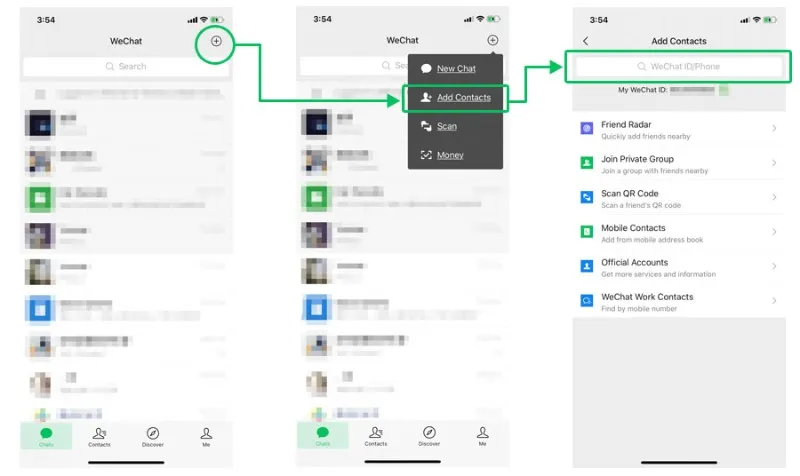
How do I add WeChat friends?
How do I join a group chat?
Users can scan a Group QR Code to join a group: Enter a group chat > tap "..." in the upper right corner > Group QR Code > tap "..." upper right > tap Save Image or Sent to Chat. Send the group QR Code to your WeChat friends, who can scan the QR Code to join the group chat.
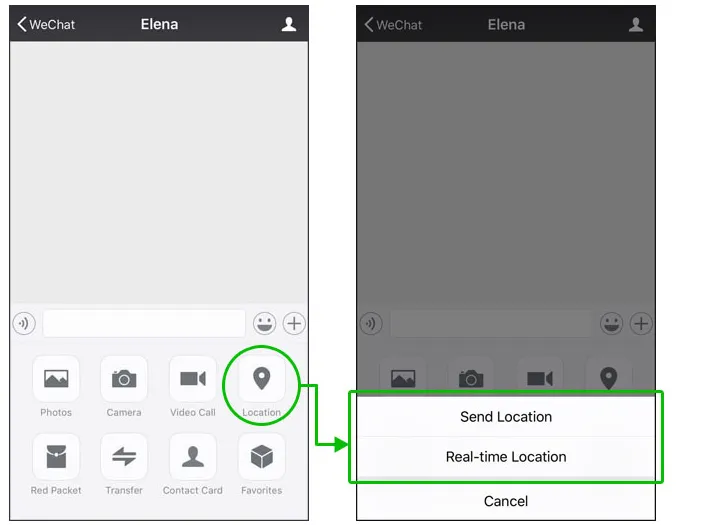
7.2 Sharing Real-Time Location (RTL)
Part 8: Common WeChat Limitations for Foreign Users and WeChat Pay Fees
While WeChat is foreigner-friendly, a few limitations remain:
-
Transfer Restrictions: There is a limit of 6,500 RMB for single transactions, a cumulative limit of 50,000 RMB for monthly transactions, and a cumulative limit of 65,000 RMB for yearly transactions. The exchange rate will be calculated based on the exchange rate of the card organization and the issuing bank of your international card.
-
Transaction Fees: transaction fees are waived for single transactions under 200 RMB. A 3% transaction fee will be applied for single transactions above 200 RMB.
-
Verification required: Full functionality requires real-name verification with your passport.
- If you receive a WeChat red envelope or transfer from someone, it will be saved in your WeChat Wallet ("Me" > "Pay and Service" > "Wallet") , but you cannot transfer or withdraw funds from your WeChat Pay balance back to a foreign bank card
💰 Pro Tip: Avoiding the 3% Foreign Card Fee
Because the 3% transaction fee only applies to single purchases over ¥200 CNY, you can legally avoid it by asking merchants to split the bill. If you are buying souvenirs for ¥300, ask the vendor to scan your WeChat code twice for ¥150 each. Since both charges are under the ¥200 threshold, WeChat will not charge the 3% fee!
Part 9: Tips, FAQs, and Troubleshooting
FAQs
Q: Do I need a Chinese phone number to use WeChat?
No, you can use your foreign phone number to register and use most features, including WeChat Pay.
Q: Can I use WeChat Pay without a Chinese bank account?
Yes! The system now allows you to link major international credit cards (Visa, Mastercard, Discover, etc.) directly to your WeChat Pay wallet for payments.
Q: Does WeChat Pay charge a fee?
Generally, transactions under RMB 200 are free. For transactions above RMB 200 using a foreign card, a small service fee (usually 3%) may be applied by the platform, which is waived for the lower amount.
Q: Why can’t I link my bank card?
Ensure your name matches your passport exactly and that your card supports online payments in China.
Q: Why won't the small vendor's QR code accept my payment?
Very small vendors often use personal QR codes linked to their bank account (P2P transfers), which are sometimes blocked for users with foreign cards. Try to pay with cash or ask if they accept payment by scanning your dynamic QR code.
Q: How do I change the app language to English?
Go to Me → Settings → General → Language. You can switch the entire interface to English or many other languages.
General Tips:
-
Keep the app updated to avoid compatibility issues.
- Download and register the app before arriving in China. This ensures you can receive SMS verification codes using your primary phone number without worrying about local SIM card activation or Wi-Fi issues.
-
Always connect to a stable Wi-Fi or mobile network when making payments.
-
Add a recovery email or phone number for account security.
WeChat will transform your experience in China. It’s a learning curve at first, but once you’ve completed your verification and linked your card, you’ll be tapping, scanning, and enjoying the efficiency of digital life in China.
Now, go explore and pay for your first cup of street coffee! You’ve mastered the essential tool!