Navigating China with Amap
-
Does Google Maps work? No. Even with a VPN, the GPS coordinates are intentionally shifted, making it useless for walking or driving in China.
-
Why Amap (Gaode)? It is the most accurate map in China, offering an English interface ("AMap Global"), real-time subway routing, and built-in taxi hailing.
-
Do I need a Chinese Phone Number? You can use the map for basic navigation without an account, but booking taxis or saving favorites requires a login (often via a linked Alipay/WeChat account).
Welcome to China, where digital navigation operates under its own set of rules. If you're relying on Google Maps, you're likely to encounter outdated routes, inaccurate location pins, and unreliable public transport information due to the "Great Firewall" limitations.
The solution is Amap (known as Gaode Ditu or 高德地图 in Chinese). Amap is the undisputed champion of digital mapping in mainland China, offering unparalleled accuracy, real-time traffic, and integration with local services. For any traveler, expat, or business visitor, mastering Amap is the single most important step to confident navigation.
Key Advantages of Amap in China:
-
Superior Accuracy: Precise location data for addresses, businesses, and points of interest (POIs).
-
Real-Time Traffic: The most up-to-date traffic and road conditions.
-
Comprehensive Public Transit: Detailed subway and bus routes with reliable real-time arrival estimations.
I. Download and Set Up Amap (Gaode Map)

1. 📲 Downloading the App
Amap has been rolling out an "AMap Global" version or updating its main app to include better English support.
-
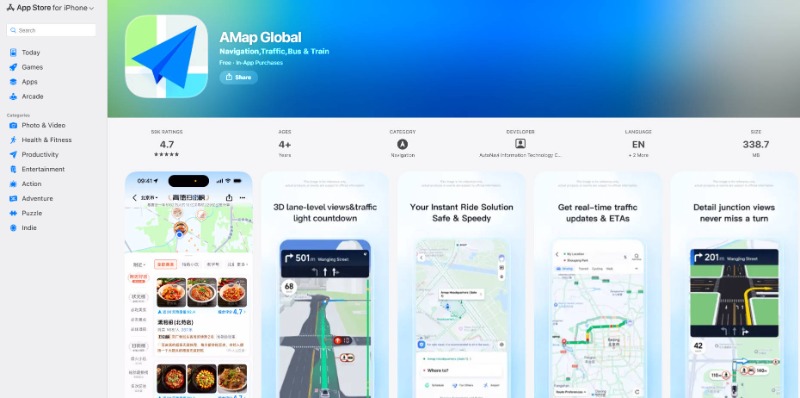
For iOS (iPhone/iPad): Search for "Amap" or "AMap Global" in the App Store.
-
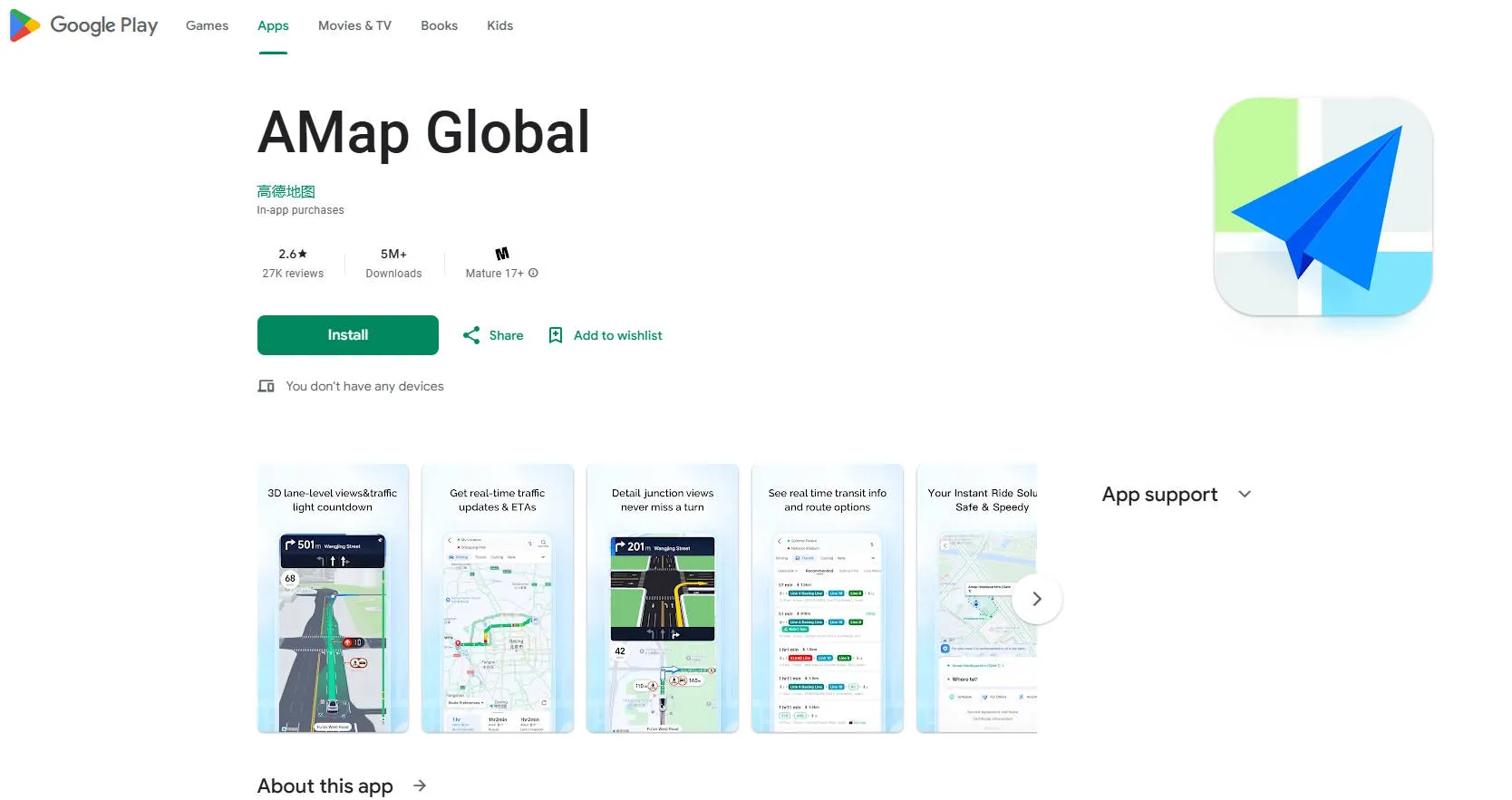
For Android: Search for "Amap" or "AMap Global" in the Google Play Store.
-
Note: If you are outside of China and cannot find it on Google Play, searching for the official name "高德地图" might also help, or you may need to look for an APK download from their official website (wap.amap.com), but using the app stores is the most straightforward method.
-
2. 🌐 Set the Language to English (If needed)
While the app's English support is improving, sometimes the language setting can be a bit hidden or may revert after updates.
Option A: The Quick Way (Check Settings)
-
Open the Amap app.
-
Look for the Profile/Me icon (often a silhouette or "未登录" meaning "not logged in") at the bottom right.
-
Tap the Settings cog/gear icon (usually top right of the profile screen).
-
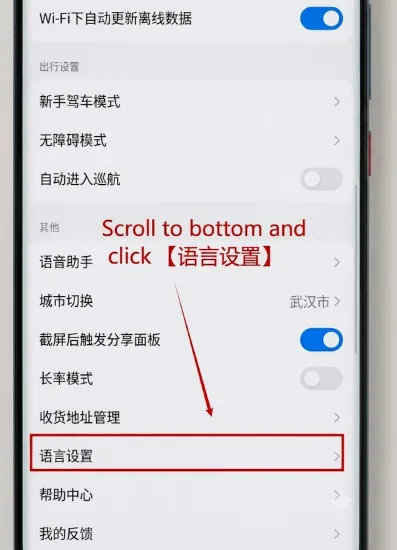
Look for 通用 (General) or a Language setting. It might be labeled 语言设置 (Language Settings).
-
Select English and you may need to force quit and re-open the app for the change to take full effect.
Option B: Change Phone System Language (A workaround)
In some versions, the app defaults to your phone's system language.
-
Go to your phone's main Settings.
-
Change your phone's language to English.
-
Open the Amap app. It may prompt you to use the English version or automatically switch its UI.
-
You can switch your phone's language back later.
3. 👤 Optional: Creating an Account
-
For Basic Navigation: You do not need to create an account to use the map, get directions, or use the navigation features. It works fine in "guest mode."
-
For Saving Favorites/Routes: To save home/work addresses or favorite locations, you generally need to log in. This often requires a Chinese phone number for verification, which can be a hurdle for international visitors. iOS users may sometimes be able to sign in using their Apple ID.
4. 🗺️ Download Offline Maps
Downloading offline maps is highly recommended to ensure you can navigate even when mobile data or Wi-Fi is spotty.
-
(If using the English UI and you can't find it) Temporarily switch the app language back to Chinese (中文) using the steps in Section 2.
-
Go to the Profile/Me screen.
-
Look for the Offline Maps tab (离线地图).
-
Choose the cities you will be visiting and download the map and navigation data.
-
Switch the app language back to English if you prefer. The downloaded maps will still work.
II. Essential Navigation Features Explained
Amap offers five main modes of navigation, accessible via the icons at the bottom of the screen (from left to right).
1. 🔎 Searching for Locations
Tap the Search Bar (搜索) at the top.
-
Using Chinese Characters: This is the most reliable method. Copy and paste the destination name.
-
Using Pinyin/English: For international brands (Starbucks, Hilton) or major landmarks, English or Pinyin often works.
-
Saving Favorites (收藏): If you frequently visit a location (like your home or office), click the location marker and look for the 收藏 (Collection/Favorite) icon to save it for easy access later.
2. 🚘 Driving Navigation (驾车 - Jià Chē)
Gaode (Amap) is the premier driving navigation app in China, offering features that go far beyond standard global map applications. It's highly accurate because it uses a combination of GPS and the Chinese BeiDou satellite system, alongside an extensive, locally managed map database.
01. Lane-Level Guidance and 3D Junction View
This is Amap's most praised feature, especially critical for navigating China's complex multi-lane highways and urban interchanges.
-
How it works: When you approach a complex split or exit, the screen shifts from the standard map view to a full 3D graphic overlay.
-
The benefit: This graphic highlights exactly which lane (or lanes) you need to be in, ensuring you don't miss a critical exit or turn on a complex interchange. It often provides this guidance up to 30 seconds ahead of the junction.
02. Real-Time Traffic & ETA
Gaode uses massive amounts of real-time data to calculate the most efficient route and accurately predict your arrival time.
-
Color-Coded Roads: The map displays real-time traffic conditions:
-
Green: Smooth traffic.
-
Yellow: Minor slowing/congestion.
-
Red: Heavy traffic/congestion.
-
Dark Red/Black: Severe delay or road closure.
-
-
Dynamic Rerouting: If a major incident or jam occurs ahead, Amap automatically searches for and prompts you to switch to a faster, alternate route.
-
ETA Accuracy: The Estimated Time of Arrival (ETA) is generally highly accurate because it factors in real traffic light times and congestion.
03. Traffic Light Countdown
A highly useful feature, especially in cities where you stop frequently.
-
How it works: While navigating, when you approach a traffic light, Amap will often display a countdown timer (e.g., "30 seconds until green") next to the icon for the traffic light on the screen.
-
The benefit: This helps drivers anticipate when to stop or start, improving fuel efficiency and reducing stress.
04. Speed Limit & Safety Camera Alerts
Amap is comprehensive in helping you avoid speeding fines.
-
Speed Limit Display: The current legal speed limit for the road you are on is clearly displayed on the navigation screen.
-
Alerts: It provides timely visual and voice warnings for:
-
Upcoming speed cameras (fixed and mobile).
-
Upcoming red light cameras.
-
Sections with strict average speed monitoring.
-
3. 🚇 Public Transit (公共交通 - Gōnggòng Jiāotōng)
This is the most critical feature for foreigners in China, as it combines subways and buses seamlessly.
01. Real-Time Bus Arrival Information
This is a game-changer for buses, which are otherwise difficult to track.
-
Live Countdown: For many routes in major cities, Gaode displays a live countdown showing the estimated time of arrival (ETA) for the next two or three buses at your stop.
-
Bus Location: You can often see the bus icon moving on the map, allowing you to estimate how far away it is.
-
Bus Route Tracking: While you are on the bus, the app tracks your progress and alerts you (often with voice prompts) when your destination stop is approaching.
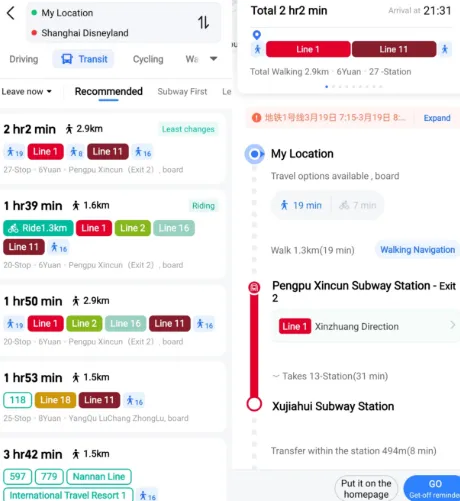
02. Metro/Subway Routing
The subway navigation is highly detailed and efficient.
-
Fastest Route Calculation: It instantly calculates the quickest route, including the most optimal transfer points.
-
Transfer Directions: When a transfer is required, the directions include:
-
The walking time needed within the station to switch lines.
-
The specific level or platform for the connecting line.
-
-
Entry/Exit Guidance: It clearly recommends the best metro exit (A, B, C, etc.) to use at both your starting station and destination station to minimize your walking distance to the final address.
03. Comprehensive Route Details
When you search for a route, Gaode gives you all the necessary information upfront:
-
Total Journey Time: A very accurate estimate of the door-to-door time.
-
Total Fare (Estimated): It often provides the estimated total cost for the journey (though this can be tricky to guarantee if you are using a contactless payment system).
-
Walking Segments: It clearly breaks down the walking time and distance required to get to and from the transit stations.
04. Step-by-Step Guidance
Once you select a route, the app provides turn-by-turn guidance:
-
Walk to Bus Stop/Metro Station: Directions to your starting point.
-
Board [Bus Number] / [Metro Line]: Clear instructions on which service to take.
-
Transit: Shows the number of stops until your change/destination.
-
Transfer/Alight: Alerts you to get off and gives you the transfer directions.
-
Final Walk: Guides you from the exit to your final destination.And other smaller local providers.
05. How to Use the Public Transit Feature
-
Input Destination: Enter your destination in the search bar (English/Pinyin works well).
-
Select Public Transit: On the route selection screen, tap the 公共交通 (Gōnggòng Jiāotōng) or Public Transit icon.
-
Compare Options: Amap will display several route choices (e.g., fastest, fewest transfers, metro-only, bus-only).
-
Choose a Route: Tap on a route to expand the detailed instructions (including real-time bus data).
-
Start Navigation: Tap the button to start the guidance.
4. 🚶 Walking and Cycling (步行/骑行 - Bùxíng/Qíxíng)
These modes offer precise, turn-by-turn walking or cycling instructions. Amap is particularly good at navigating pedestrian overpasses, underground tunnels, and complex city sidewalks.
01. Walking (步行 - Bùxíng) Navigation
The walking feature is straightforward but includes some local advantages:
A. Accurate Pathfinding
-
Small Alleys and Shortcuts: Unlike some global maps that may only stick to major roads, Gaode's extensive local data includes small pathways, pedestrian bridges, and alleys, often resulting in a shorter and more accurate route through dense urban areas.
-
Building Integration: It frequently shows paths that lead directly through shopping centers or plazas, which are common shortcuts in Chinese cities.
B. Pedestrian Voice Guidance
-
Clear Directions: The voice guidance (available in English if the app is set to English) is clear and focuses on landmarks or specific road changes, rather than just compass directions.
-
Distance Countdown: As you walk, it gives you clear distance updates (e.g., "In 100 meters, turn right onto East Nanjing Road").
C. Indoor Maps (Select Locations)
-
For very large buildings, like major shopping malls, airports, and train stations, Gaode often provides indoor maps. If your destination is inside one of these complexes, the app will continue to guide you to the specific unit or gate.
02. Cycling (骑行 - Qíxíng) Navigation
Cycling is extremely popular in Chinese cities, often using shared bikes. Gaode's cycling feature is specifically tailored for this environment.
A. Dedicated Cycle Lane Prioritization
-
Optimized Routing: The app prioritizes routes that utilize dedicated cycle lanes (which are common in China), even if the route is slightly longer than the fastest main road. This increases safety and speed for cyclists.
-
Avoiding Motorways: It automatically avoids highways and tunnels where cycling is prohibited.
B. Elevation Data and Terrain View
-
For longer rides, Gaode often includes a simple elevation profile along the route, helping you anticipate hills or steep inclines.
C. Integration with Shared Bikes (Optional but common)
While Amap itself is a map, it often integrates with bike-sharing services like Meituan Bike or Hello Bike.
-
It may show the location of nearby shared bikes.
-
It might allow you to scan the QR code to unlock a bike directly within the Amap interface, depending on the current integration agreements.
-
Note: Using shared bikes typically requires linking to an Alipay or WeChat Pay account for payment.
03. Using the Features
-
Input Destination: Enter your starting point and destination.
-
Select Mode: Tap the 步行 (Bùxíng) or 骑行 (Qíxíng) icon (or "Walking" / "Cycling" in English).
-
Compare Routes: For both walking and cycling, Amap often provides two or three route options (e.g., fastest, safest, or scenic).
-
Start Navigation: Tap to begin. The app's accurate GPS tracking will ensure you stay on course even on narrow streets.
5. 🚖 Taxi/Ride-Hailing Integration (打车 - Dǎ Chē)
This is one of the most important and convenient features of Amap (Gaode Map) for travelers in China. It's essentially a ride-hailing comparison and booking platform built right into the map.
01. The Gaode Ride-Hailing Advantage
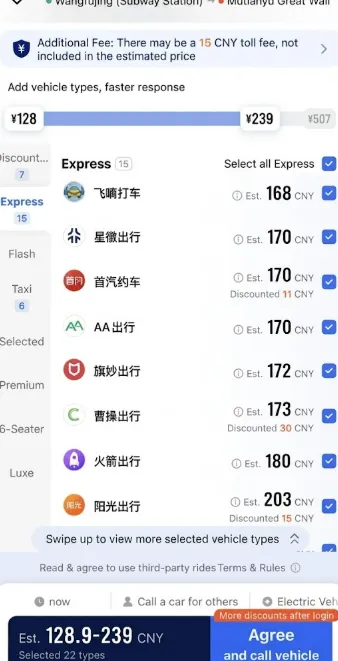
Gaode (Amap) acts as a ride-hailing aggregator (often called 打车 / Dǎchē in the Chinese UI). When you request a ride, it simultaneously checks and displays prices from all the major ride services in China, including:
-
Didi (DiDi Chuxing)
-
Cao Cao Mobility
-
Meituan Dache
-
Traditional Taxis
-
And other smaller local providers.
The Benefit: You get to compare the estimated price and wait time from all services on one screen, allowing you to choose the quickest or cheapest option without opening multiple apps.
02. Step-by-Step Booking Process
-
Enter Destination: Use the Amap search bar to input your destination. You can use English or Pinyin for major landmarks; the app is excellent at finding the corresponding Chinese address.
-
Select Ride-Hailing: On the route options screen, tap the Taxi/Ride-Hailing option (often labeled 打车 Dǎchē).
-
View Options: Amap will display a list of all available services, such as "Express," "Comfort," "Taxi," and "Carpool," with the estimated price and wait time for each.
-
Confirm & Book: Tap on the service and price you want. You will be asked to confirm your pickup spot (usually auto-detected) and then confirm the order.
-
Driver Contact: Once a driver accepts, you will see their license plate number, car type, and a map showing their location. The app may offer a chat feature with auto-translation, which is useful if the driver calls you and you don't speak Chinese.
- Automatic Payment: The fare is automatically deducted after you exit the vehicle.
03. Critical: International Payment Setup
This is the only real hurdle, but it is now much simpler due to recent changes allowing international cards to be used in China's mobile payment ecosystem. You cannot pay Amap directly with an international card. You must link your payment through either Alipay or WeChat Pay first.
| Payment Method | Key Action |
| 1. Set up Alipay/WeChat Pay | Download the app (Alipay is often cited as the easiest for tourists), register with your international phone number, and complete the required real-name verification (scanning your passport). |
| 2. Link International Card | Go into the wallet/payment settings of Alipay or WeChat Pay and successfully link your international Visa, Mastercard, Discover, or Amex. This is essential. |
| 3. Automatic Integration | When you book a ride in Amap, it will automatically connect to your linked mobile payment wallet (Alipay or WeChat Pay) to deduct the fare from your international card once the ride is complete. |
Pro Tip: Make sure you complete the setup and verification of your mobile payment app before you need to hail a ride. A successful link means payments in Amap should be seamless.
04. Handling Driver Communication
Since most drivers only speak Mandarin, you should be prepared for basic communication:
-
In-App Chat: Look for an in-app messaging feature within the booking screen. This often includes a real-time translation feature, which is the easiest way to clarify your location.
-
Simple Phrases: Have one or two Chinese phrases saved:
-
I am here: 我在这里 (Wǒ zài zhèlǐ)
-
Follow the navigation: 跟着导航走 (Gēnzhe dǎoháng zǒu)
-
III. Amap (Gaode Map) vs Baidu Map vs Didi
Google Maps is not a reliable primary navigation tool in mainland China. While you may be able to get it to load, it is severely hampered by government regulations and internet restrictions. Amap (Gaode Map), Baidu Map, and Didi serve different primary purposes, but their features overlap, especially when it comes to navigation.
Here is a side-by-side comparison to help you decide which one(s) to use:
| Feature | Amap (Gaode Map) | Baidu Map (百度地图) | Didi (滴滴出行) |
| Primary Function | Navigation & Mapping (All-in-one local map) | Navigation & POI (All-in-one local map + business data) | Ride-Hailing (China's equivalent of Uber) |
| English Support | Best for Tourists. Has a growing English interface (AMap Global), accepts English search inputs, and provides English voice guidance. | Limited/Minimal. Interface is mostly Chinese. Requires more effort (screenshot translation) to use, though English search sometimes works. | Excellent. Standalone app has a full English interface specifically for foreigners. |
| Navigation Accuracy | Excellent (Especially Driving). Often favored by drivers for superior lane-level guidance and real-time traffic light timers. | Excellent (Especially POI). Known for having a slightly better database of small local businesses (Points of Interest/POI). | Reliable. The map within the Didi app is highly accurate for ride-hailing purposes. |
| Public Transit | Excellent. Provides accurate real-time bus and metro arrival predictions. Highly reliable for detailed transfers. | Excellent. Also provides extensive and accurate public transport data, including exit recommendations. | Poor/Non-existent. Only shows maps for ride purposes; no public transit planning. |
| Ride-Hailing | Aggregator. Integrates with Didi and other services, allowing you to compare prices from multiple vendors (including Didi) in one spot. | Aggregator. Also offers ride-hailing comparisons, similar to Amap. | Direct Service. This is the app you use to book the car itself. |
| Offline Maps | Yes. Recommended for downloading entire cities/provinces. | Yes. Also supports offline map downloads. | No. Requires an internet connection. |
The best approach is to use a combination of apps based on the task:
| Task | Recommended App | Why? |
| Public Transit, Walking, or Driving | Amap (Gaode Map) | The recent addition of an English UI and excellent, granular navigation features (like lane guidance) make it the most user-friendly and reliable all-purpose map for foreigners. |
| Booking a Taxi/Car | Didi (Standalone App) | Provides a full, seamless English experience for hailing cars, with clear destination entry and payment via linked international mobile payments. |
| Comparing Car Prices | Amap | If you want to see if another ride service is cheaper or faster than Didi, check the Dache (打车) feature in Amap. |
| Finding Local Restaurants | Baidu Map (or Dianping) | If you are willing to use an in-app translator, Baidu often has a broader and more current database of small, local businesses. |
In summary, for most travelers, download and set up Amap (Gaode Map) for all your navigation needs, and download Didi for effortless ride-hailing.
🍎 A Note for iPhone Users: The Apple Maps Hack
If you have an iPhone, the native Apple Maps app is actually a highly viable alternative. Because Apple legally licenses its China mapping data directly from Gaode (Amap), it is incredibly accurate. The major benefit is that the entire interface and street names remain in English. However, you will miss out on Amap's advanced features like hailing taxis directly within the app.
IV. Pro Tips for Foreign Users
Pro Tip 1: Download Offline Maps
If you are traveling to a remote area or anticipate poor cellular service (or issues with your VPN), always download the map data for your target city in advance.
-
Go to the main menu (我的 - Wǒ de / My Profile).
-
Find 离线地图 (Líxiàn Dìtú / Offline Map).
-
Select the cities you need to download.
This ensures you can still view maps and calculate non-real-time routes even without an internet connection.
Pro Tip 2: Copy-Paste and Screenshot
Since typing Chinese is difficult for non-native speakers, keep the Chinese characters for your hotel, train station, and key destinations saved in a note or chat.
-
Copy the Chinese Name: Paste it directly into Amap's search bar.
-
Share Location: If you receive a location pin from a Chinese friend on WeChat, you can often click to open the location directly in Amap.
Pro Tip 3: Indoor Mapping
For large, multi-story shopping malls, airports, and train stations, Amap often includes indoor maps. When you zoom in on a complex building, you may see different floor levels (F1, B1, etc.) appear on the side of the screen, allowing you to navigate within the structure itself.
Frequently Asked Questions (FAQ)
Q: Is Amap available in English?
Not fully, but works well with English searches & Pinyin.
Q: Does Amap work without VPN?
Yes. It is a domestic Chinese app.
Q: Is it safe to use Amap?
Yes. It is widely used by hundreds of millions daily.
Q: Can I use it to call a taxi?
Yes, fully integrated with local taxi fleets and Didi.
Q: Does it support offline maps?
Yes, recommended for travelers.
By replacing your habitual reliance on Google Maps with the local expertise of Amap, you gain access to the most accurate, real-time data available in China. It is the definitive tool that transforms complex Chinese navigation into a smooth, manageable experience. Download it, save your critical locations, and travel with confidence.