Planning a trip across China’s spectacular high-speed rail network is an exciting adventure, but for many international tourists, the journey hits a roadblock before it even begins. To book tickets on China's official railway platform, 12306, foreign travelers in China must first complete a mandatory real-name identity verification using their passports.
Fortunately, the China Railway 12306 platform now offers both a mobile app (Google Play | Apple App Store) and a web version with full English language support, making it much easier for global travelers to navigate. However, encountering a 12306 passport verification failed error is one of the most common issues foreigners face during registration.
If your 12306 passport verification failed as a foreigner, don't panic—this does not mean you cannot travel. In most cases, this error is caused by minor input mistakes, formatting issues, or system lag that can be fixed online in just a few minutes.
This ultimate 2026 guide will walk you through exactly why your 12306 passport verification might have failed and provide step-by-step, proven solutions to get your account fully verified and ready for booking fast.
⚡ Quick Fix Summary:
-
Check Name Format: Ensure you typed your First and Middle names together in ALL CAPS, with exactly one space between them.
-
Skip the Scanner: Do not use the automatic OCR camera scanner; type your MRZ details manually.
-
Use Manual Upload: If auto-verification fails, use the "Reupload ID" feature to take a selfie with your passport.
-
Go to the Station: If all else fails, a physical ticket window can verify you instantly.
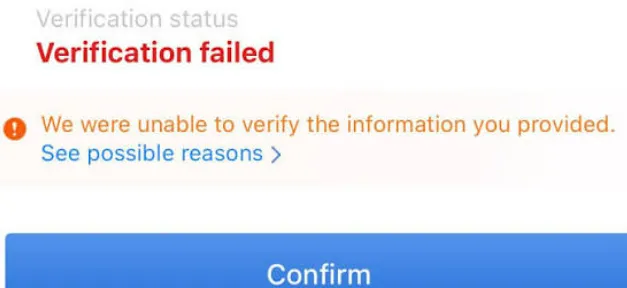
What Does "Passport Verification Failed" Mean on 12306?
When using the 12306 platform, you might encounter the dreaded status: "Verification Failed" (验证未通过) or "Pre-verified Failed." This error typically triggers during three key actions:
-
Creating a new account: When you try to register your own passport details as the primary user.
-
Adding a passenger: When you attempt to add friends, family, or travel companions to your contact list for booking.
-
Purchasing train tickets: When the system runs a final check on your passenger list before processing payment.
It is crucial to understand that this error does not mean your passport is fake, invalid, or blacklisted. It simply indicates that the 12306 system was unable to cross-reference and match the text characters you entered against its official identity verification database (which connects to China's immigration and border control systems).
Key Takeaway: "Passport Verification Failed" simply means that 12306 could not verify your passport information against its identity verification system.
Because the system relies on an exact character-by-character match, even a tiny formatting discrepancy—such as putting your middle name in the wrong field, mixing up the order of your surname, or a minor optical character recognition (OCR) scanning glitch—will result in an automatic rejection.
Why Does Passport Verification Fail?
Understanding the root cause of your 12306 passport verification failed error is the fastest way to resolve it. Below is a quick-reference summary table of the most common reasons foreign passport holders experience verification issues, followed by a detailed breakdown of each cause.
Quick Diagnostics: Common Causes & Solutions
|
Common Cause |
Description |
Solution |
|---|---|---|
|
Incorrect passport number |
Minor typing mistakes, adding spaces, or confusing characters (like |
Carefully re-enter your passport number without spaces or special symbols. |
|
Name mismatch |
The order, capitalization, or spacing of your name doesn't match your passport's MRZ (Machine Readable Zone). |
Input your full name exactly as formatted on your passport, including middle names. |
|
Wrong nationality |
Selecting your country of residence instead of your passport-issuing nation. |
Update your nationality/region to match the issuing country of your passport. |
|
Expired passport |
Attempting to register or travel with a passport that has already expired. |
Use a valid, current passport with at least 6 months of validity. |
|
OCR recognition error |
The 12306 App scan feature misread characters or aligned fields incorrectly during upload. |
Skip the auto-scan and manually enter all of your passport details. |
|
Duplicate account |
Your passport is already linked to another 12306 account (often created by a travel agency). |
Retrieve your original account credentials or request to unlink the duplicate. |
|
System maintenance |
Temporary offline synchronization issues between 12306 and immigration databases. |
Wait a few hours and try submitting your details again. |
Deep Dive: Analyzing the Common Causes
1. Name Mismatch (The #1 Culprit)
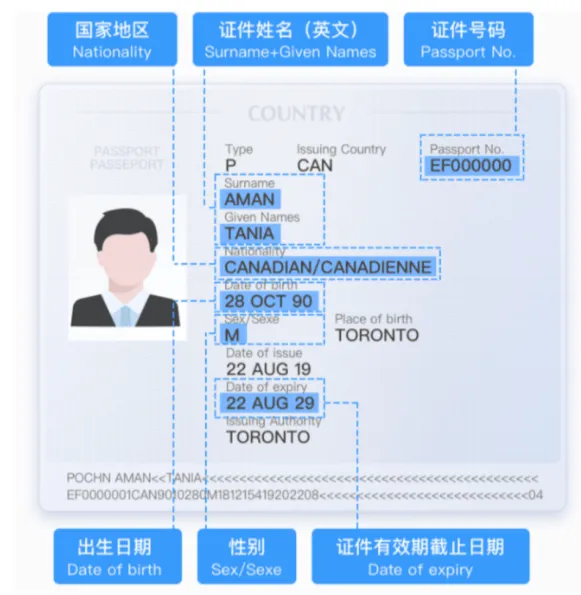
Western and non-Chinese naming conventions often confuse the 12306 database structure. If your passport displays your name as Smith, John Alan, entering it simply as John Smith or placing Alan in a separate middle name field that the system does not recognize will cause an immediate mismatch. 12306 compares your entry to the Machine Readable Zone (MRZ)—the two lines of text at the bottom of your passport photo page.
2. OCR Scanning Mistakes
While the 12306 App has a handy camera feature to scan and auto-populate your passport page, the OCR (Optical Character Recognition) technology is far from perfect. It frequently:
-
Confuses the number zero (
0) with the capital letterO. -
Confuses the number one (
1) with the capital letterIorL. -
Crops out middle names or cuts off long surnames.
3. Duplicate Account Conflicts
If you have previously booked a Chinese train ticket through third-party platforms (like Trip.com, Klook, or a local travel agency) before registering your own 12306 account, those agencies might have already registered your passport in their system. 12306 only allows a unique passport number to be verified under one primary identity.
4. Nationality Selection Errors
Some travelers holding dual nationalities or living as expats in a different country accidentally select their country of residence or departure rather than the passport-issuing country. The system cross-checks your passport number against immigration logs based strictly on the issuing country's country code.
Before You Start: What You'll Need for 12306 Passport Verification
To ensure a seamless 12306 real-name verification experience and avoid unnecessary retries, gather all required documents and details beforehand. Preparing the correct information according to Chinese system specifications will save you time and prevent system locks.
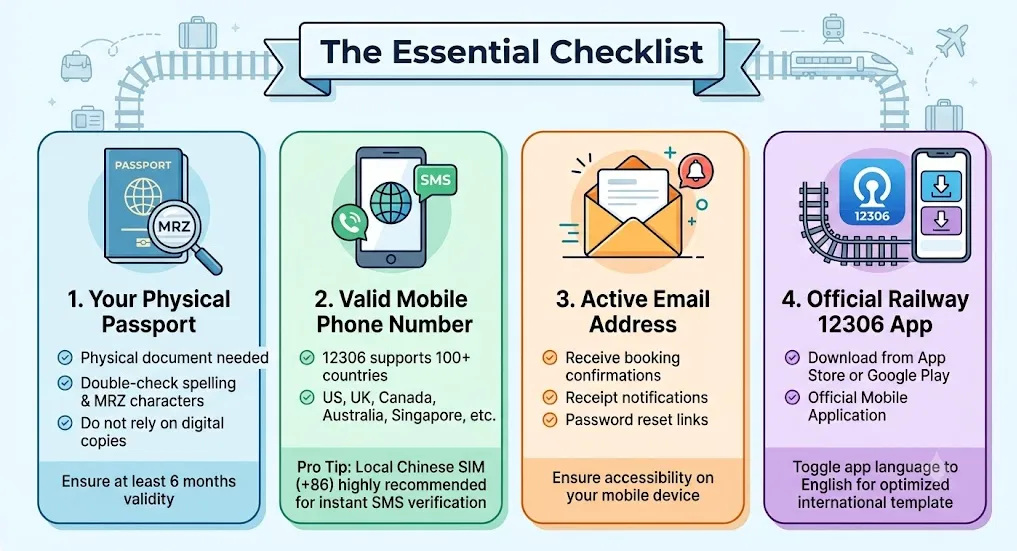
The Essential Checklist
-
Your Physical Passport
-
Do not rely on digital copies or photos stored on your phone. You need the physical document to double-check spelling, spacing, and characters in the Machine Readable Zone (MRZ).
-
Ensure your passport has at least 6 months of remaining validity.
-
-
A Valid Mobile Phone Number
-
12306 now supports international phone numbers from over 100 countries (including the US, UK, Canada, Australia, and Singapore).
-
Pro Tip: While international numbers are accepted, SMS delivery for the required verification code can sometimes be delayed or blocked by local carriers. If you are already in China, using a local Chinese SIM card (
+86) is highly recommended for instant verification.
-
-
An Active Email Address
-
This is used to receive booking confirmations, receipt notifications, and password reset links. Ensure it is an email address you can access easily on your mobile device during your travels.
-
-
The Official Railway 12306 Mobile App or Official Website
-
Download the official app from the Apple App Store or Google Play Store.
-
Make sure you toggle the app language to English (usually selectable on the startup screen or via the personal settings menu) to ensure you are entering information into the optimized international user template.
-
Crucial Network Tip: If you are using a VPN on your phone, you should temporarily disable it when registering or verifying your identity on 12306. The platform's security firewalls often block or slow down requests originating from VPN servers, which can lead to timed-out verification requests and false error messages.
Step-by-Step Guide: How to Verify Your Passport on the 12306 App
Registering and completing your 12306 real-name verification directly on the mobile app is the easiest and most reliable method for international travelers. Follow this step-by-step tutorial to get your passport verified correctly on the first attempt.
Step 1: Download the App and Set Language to English
-
Open the App Store (iOS) or Google Play Store (Android), search for "Railway 12306", and download the official app.
-
Upon opening the app for the first time, look for the language toggle. If it defaults to Chinese, tap the "Me" (我的) icon in the bottom-right corner, then tap the "Settings" (设置) gear icon in the top-right.
-
Tap "Language Settings" (语言设置) and select "English". Confirm your choice.
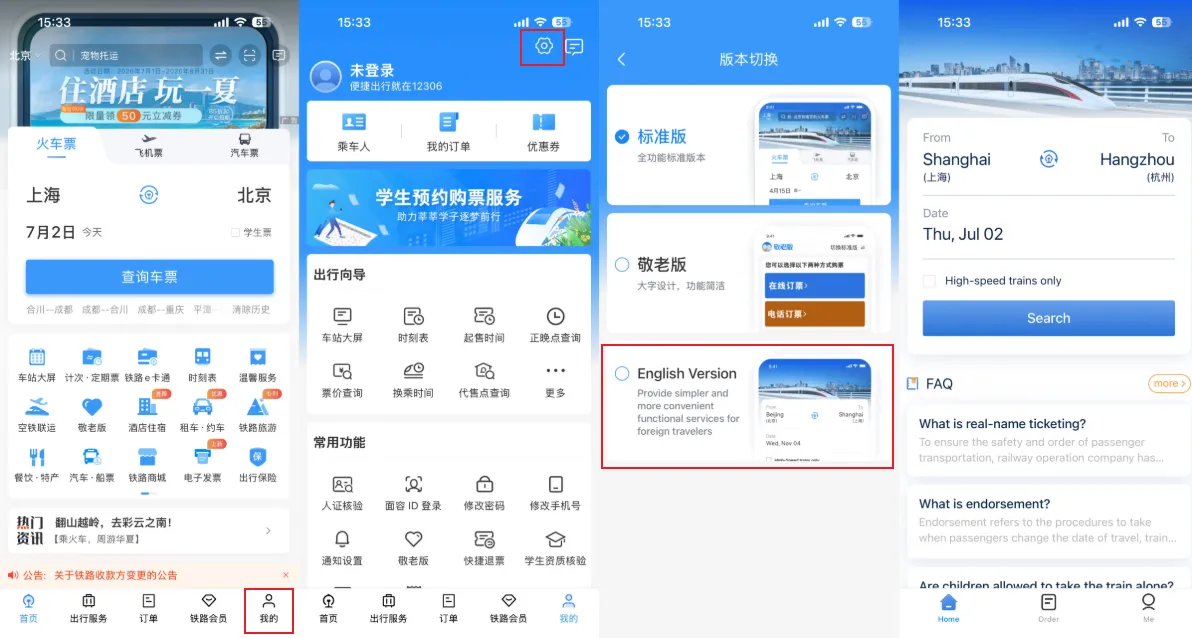
Step 2: Initiate Account Registration
-
In the English interface, tap "Me" in the bottom-right corner.
-
Tap the "Register" button at the top of the screen.
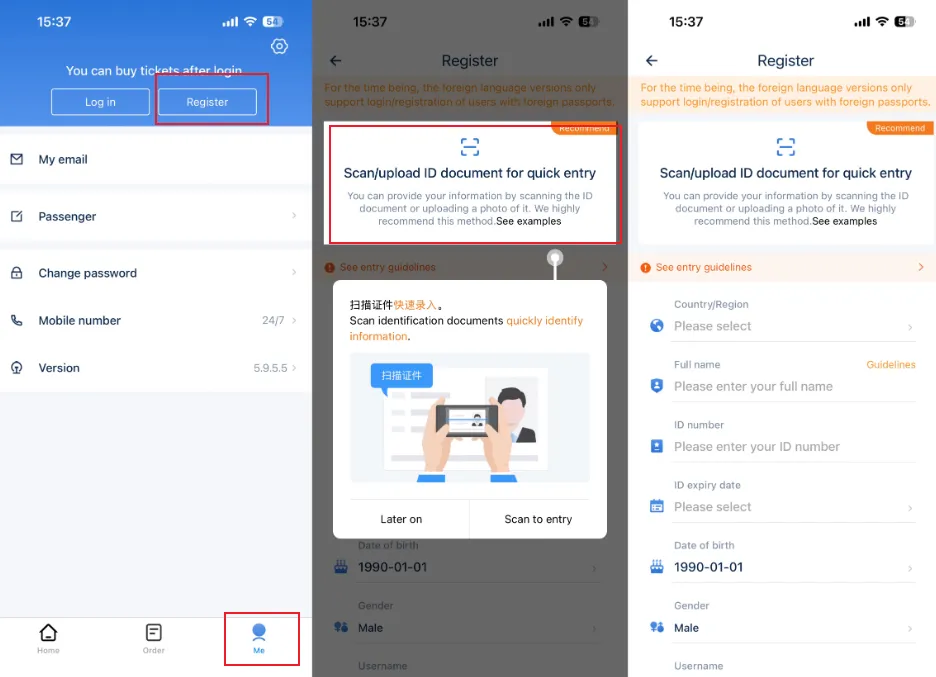
Step 3: Enter Your Personal Details (The "Gold Standard" Format)
To guarantee your 12306 passport verification succeeds automatically, you must format your name exactly as it appears on your passport's Machine Readable Zone (MRZ).
-
ID Type: Choose "Foreign Passport" (do not select other passport types unless you hold a specialized Chinese diplomatic passport).
-
First Name & Middle Name: Enter your first and middle names together in this field, separated by a single space.
-
Example: If your passport shows First Name: John, Middle Name: Alan, enter
JOHN ALAN. Use all capital letters.
-
-
Last Name (Surname): Enter your last name exactly as it appears.
-
Example:
SMITH.
-
-
Gender & Date of Birth: Match your passport photo page.
-
Passport Number: Enter your passport number in all capital letters with no spaces, hyphens, or special characters.
-
Passport Expiration Date: Select the exact expiry date.
-
Nationality/Region: Search and select your passport's issuing country.
Step 4: Link Your Contact Information and Submit
-
Enter your Email Address and your Mobile Phone Number (select your country's dialing code first).
-
Create a secure password and agree to the Terms of Service.
-
Tap "Next" to trigger a verification code.
-
Input the verification code sent to your phone or email. Tap "Submit" to complete registration.
Step 5: Check Your Verification Status
Once submitted, the system automatically checks your identity. To check your status:
-
Go to the "Me" tab.
-
Tap on your name/profile icon at the top left.
-
Look at your "Verification Status".
-
Verified: Success! You can now book tickets immediately.
-
Verification Failed / Pre-verified Failed: If you see this, proceed to the manual photo verification step below.
-
Users can log in to the 12306 China Railway App and check the current status of their identity review in the "Me" (我的) section. Users who have passed the identity verification will see "Authenticated" (已实名认证) while those who failed to pass the identity verification will see "Unauthenticated" (未实名认证) displayed on their account.

How to Bypass "Verification Failed" (Manual Photo Upload)
If the automated check fails, 12306 allows you to submit a photo of your passport and a selfie for manual human review.
-
Under your profile page where it says "Verification Failed", you can initiate the 12306 manual photo verification by tapping the "Reupload the photo of passenger's ID document" button.
-
Upload Photo 1 (Passport Bio Page): Take a clear, high-resolution photo of your passport's main photo page. Ensure there is no glare, shadow, or fingers blocking the MRZ zone at the bottom.
-
Upload Photo 2 (Selfie with Passport): Take a photo of yourself holding your passport open next to your face. Your face and the passport details must both be in sharp focus.
-
Tap "Submit". Manual verification typically takes between 2 to 24 hours. Keep checking your App status—once it turns green and says "Verified", you are good to go!
This [12306 App English Guide: How to Buy China Train Tickets] will help you if you're a first time travel to China.
Step-by-Step Guide: How to Verify Your Passport on the 12306 Website
If you prefer planning your trip on a larger screen, you can complete your 12306 passport verification using the official 12306 website. While the mobile app is highly recommended for its built-in camera functions, the English web platform is a robust alternative that works great on desktop browsers.
Step 1: Access the Official English 12306 Website
-
Open your desktop browser and go directly to the official 12306 English portal: www.12306.cn/en/index.html.
-
Ensure you are on the official site (look for the locked padlock icon in your browser address bar indicating a secure connection) to protect your personal passport data.
Step 2: Open the Registration Form
-
On the top-right corner of the homepage, click on "Register".
-
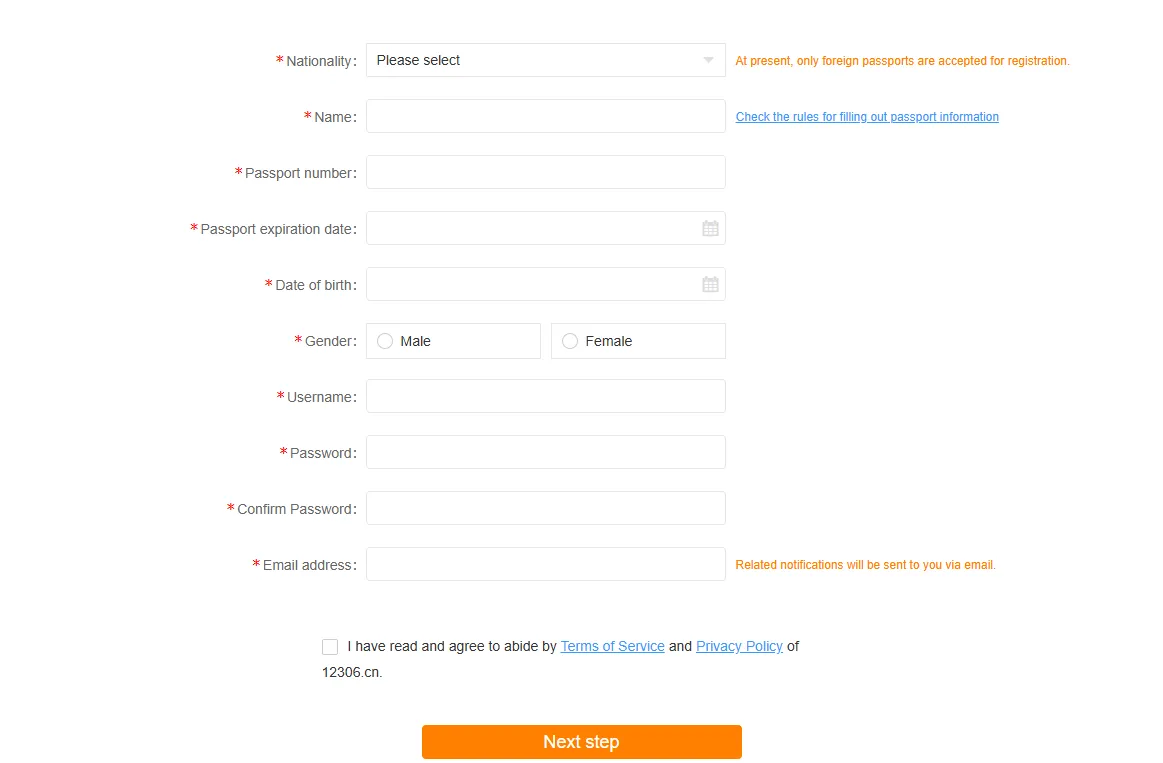
The page will redirect you to the international registration form. Note that the website layout has fields optimized specifically for foreign passport holders.

Step 3: Fill Out Your Profile (Desktop View Guidelines)
Just like the App version, consistency is everything here. Type everything using ALL CAPS.
-
Type of ID: Select "Foreign Passport".
-
First Name / Middle Name: Type your first name, add a single space, and then type your middle name.
-
Example:
JOHN ALAN. (Do not include hyphens or slashes unless they are explicitly in the MRZ of your passport).
-
-
Last Name: Enter your family name.
-
Example:
SMITH.
-
-
Country/Region: Click the dropdown list and select your passport’s issuing country.
-
ID No. (Passport Number): Enter your passport number. Make sure to use capital letters for any alphabetical characters. Do not add spaces.
-
Expiry Date: Select the date from the interactive calendar popup.
Step 4: Input Contact Information and Set Security
-
Email Address: Enter a valid email address. This is critical as the website utilizes email verification.
-
Mobile Number: Select your country's international calling code (e.g.,
+1for US/Canada,+44for UK) and enter your mobile number. -
Password: Choose a password containing letters and numbers (8 to 20 characters).
-
Submit: Check the box to agree to the "Terms and Conditions," then click "Next".
Step 5: Activate Your Account via Verification Link
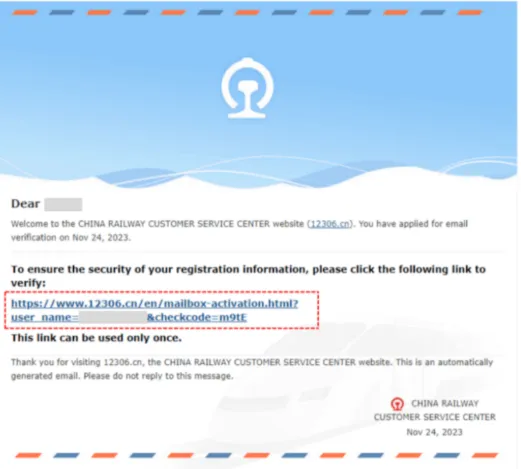
Unlike the App, which uses instant SMS/email OTP codes, the 12306 Website often sends an activation link to your registered email.
-
Open your email inbox and look for an email from
12306(check your Spam/Junk folder if you don't see it within 3 minutes). -
Click the secure verification link inside the email to activate your account.
-
Once clicked, you will be redirected back to the 12306 portal with a confirmation message saying your email has been verified. You can now log in and check your passport verification status.
Common Website Issue: If the verification page loads as a blank screen or a captcha fails to load, try disabling your ad blocker, switching your browser (Google Chrome or Microsoft Edge work best), or clearing your browser's cache.
Users can also log in to the website to check the current status of their identity review via "View Personal Information" (查看个人信息). Users who have passed the identity verification will see "Successful" (已通过) while those failing the identity verification will see "Failed" (未通过) displayed on their account.
What to Do If Online Verification Still Fails (Offline & Station Verification)
In these situations, your two main backup options are contacting 12306 customer support or completing a face-to-face real-name verification at a physical railway station ticket office in mainland China.

Option 1: Contacting 12306 Customer Support (Phone & App Live Chat)
Before making a trip to a physical train station, you can try contacting 12306 customer support directly. They have dedicated English-speaking representatives who can help troubleshoot account locks or manual verification delays.
1. Calling the 12306 Customer Support Hotline
-
Inside Mainland China: Dial
12306(or[Area Code] 12306to reach a specific city's railway bureau, e.g.,021-12306for Shanghai). -
From Outside Mainland China: Dial
+86 10 12306(Beijing Bureau) or+86 21 12306(Shanghai Bureau). -
English Service: Once connected, listen to the automated prompt. Typically, you can press "2" (or follow the voice prompts) to switch to the English-speaking service desk. Note that waiting times for English operators may be slightly longer during peak holiday periods.
2. Using the App Live Chat & Feedback
You can also access the online support within the 12306 Mobile App:
-
Open the 12306 App in English.
-
Go to the "Me" tab in the bottom right.
-
Tap on "Feedback" or "Customer Service".
-
Select "Online Support" to initiate a chat with a virtual assistant or request to be transferred to a live human agent.
Option 2: Visit a Physical Ticket Office for a China train station passport check (Offline)
If phone or online support cannot resolve the issue immediately, or if you are already at the terminal and need to board your train shortly, visiting a physical ticketing window is the absolute fastest, most guaranteed method to complete your 12306 real-name verification.
Who Needs to Go to the Station?
-
You submitted manual photos on the app, but after 24 hours the status is still "Failed" or "In Review".
-
You have already arrived in China and need to travel immediately but cannot book tickets online.
-
Your passport was previously registered by an unknown travel agency, and the system refuses your duplicate attempts to register.
What Documents to Bring
To prevent multiple trips, make sure you bring the following items to the station:
-
Your original physical passport (digital copies, photos, or photocopies are strictly rejected).
-
Your registered mobile phone containing the active 12306 App showing your account login details or email confirmation.
-
If you are verifying a travel companion (passenger), it is highly recommended to bring their original physical passport as well. Some station staff may allow a clear printed photocopy of a companion's passport, but rules vary by station; having the physical document is the safest bet.
Step-by-Step Station Verification Process
-
Arrive Early: Train stations in China are massive and can be very crowded. Arrive at least 1 hour before your desired ticket purchase/travel window.
-
Locate the Ticket Office (售票处): Look for signs pointing to the Ticket Office. This is usually located on the ground floor outside the security gates or adjacent to the main entrance.
-
Find the Right Window: Look for a ticket counter labeled "Ticket Services" (售票/退票/改签) or "General Services" (综合服务). At major hub stations (e.g., Shanghai Hongqiao, Beijing South, Guangzhou South), there is often an "English Service" or "Foreigner Service" window. If you cannot find one, join any open counter lane.
-
Present Your Case: Hand your passport and phone to the ticket clerk.
-
System Entry: The ticket clerk will manually type your passport details and verify your identity in their internal terminal. This updates the national database immediately.
-
Check Your App: Before walking away from the window, open your 12306 App and refresh your profile. The red "Unverified" or "Failed" status should instantly turn green and show "Verified" (已通过).
Language Help: Offline Communication Card
Most ticket agents in tier-2 or tier-3 Chinese cities may not speak fluent English. You can save or screenshot this bilingual communication card and show it directly to the clerk through the glass window:
For Account Registration Verification (您的个人账户核验):
English: "Hello, my online passport verification failed. Could you please manually verify my identity in your system so I can use my 12306 account?"
Chinese (简体中文): "您好,我在12306 App上的护照实名制线上核验没有通过。麻烦您帮我在系统里人工核验一下身份,以便我能正常使用账号,谢谢!"
For Passenger Verification (为您的同行人/乘车人核验):
English: "Hello, I want to buy a ticket for my friend, but their passport is showing 'Verification Failed' in my passenger list. Could you please verify this passport?"
Chinese (简体中文): "您好,我想给我的朋友买票,但他的护照在常用联系人中显示‘未核验通过’。麻烦您帮我线下核验一下这个护照信息,谢谢!"
Frequently Asked Questions (FAQs)
To help you troubleshoot any remaining doubts about 12306 passport verification, here are the answers to the most common questions asked by international travelers in China.
Q1: How long does 12306 passport verification take?
A:
-
Automatic Verification: If the name, passport number, and nationality you enter match the immigration database perfectly, the verification is instant (takes less than 10 seconds).
-
Manual Photo Review: If the automatic check fails and you submit photos of your passport and a selfie, it usually takes 2 to 24 hours for a staff member to manually review and approve your profile.
Q2: My 12306 verification status says "Pre-verified" or "Pending Review" instead of Failed. What should I do?
A: "Pre-verified" (待核验) usually means the system is still syncing with the immigration database, or you have submitted manual photos that are waiting for human review. Do not submit multiple requests. Wait up to 24 hours. If you need to travel immediately, take your passport to a physical station window.
Q3: Can I verify my passport without a Chinese phone number?
A: Yes, absolutely. The 12306 App and English website allow you to register with international phone numbers from over 100 countries. You will just need to select your country code (e.g., +1 for USA, +44 for UK, +65 for Singapore) before typing your number.
Note: Make sure your international line can receive foreign SMS messages, as 12306 will send a registration OTP (One-Time Password).
Q4: Can I buy train tickets before my passport is verified?
A: No. You can add passenger names and search for train routes, but when you click "Submit Order," the system will block the transaction if any selected passenger has an "Unverified" or "Verification Failed" status. Identity verification must be fully completed before you can purchase or reserve a seat.
Q5: How many verification attempts are allowed?
A: There is no officially stated limit for manual submission attempts. However, if your automated submissions fail 3 times in a row, the system may temporarily freeze your input screen or prompt you to submit manual photos immediately. If you get completely locked out, you will have to resolve it at a physical station window.
Q6: Does 12306 passport verification expire?
A: Your verified status does not expire as long as your registered passport remains valid. However, your 12306 profile is linked directly to your passport's expiration date. Once that date passes, your account status will automatically revert to "Expired" or "Unverified", requiring you to update your records.
Q7: What should I do after renewing my passport?
A: If you get a new passport (which will have a new passport number and expiry date):
-
Log into your existing 12306 App.
-
Go to "Me" > "Passenger" (or your personal info).
-
Update your passport number, expiry date, and submit it for verification.
-
Alternatively, you can add your new passport details as a "New Passenger" under your account, or register a new primary account if your old email/phone number is no longer accessible.
Q8: Can I verify my passport at any Chinese railway station?
A: Yes. You can go to the ticket office of any manned railway station in mainland China (even small regional stations). However, larger high-speed rail hub stations in major cities are recommended because their staff are much more experienced with foreign passports and are more likely to speak basic English.
Q9: Is the 12306 website available in English?
A: Yes, there is an official English portal. You can access it at www.12306.cn/en/index.html. The layout is clean, responsive, and specifically tailored for international credit cards and foreign passports.
Q10: Can I use the same passport for multiple 12306 accounts?
A: No. 12306 strictly enforces a "one passport, one primary account" policy. If your passport is already linked to another phone number or email (perhaps registered by a travel agency in the past), you will not be able to create a new account with it. You must either retrieve the login details of the existing account or visit a station window to have the duplicate account unlinked.
Conclusion
Completing your 12306 real-name verification is the single most important step to unlocking the magic of China’s world-class high-speed rail system. While encountering a 12306 passport verification failed status can be incredibly frustrating, keep in mind that the roadblock is almost always caused by minor, easily fixable formatting discrepancies or temporary system synchronization lags.
By carefully formatting your name to match your passport's Machine Readable Zone (MRZ), bypassing automated system errors via the mobile app’s photo upload portal, or making a quick and straightforward visit to a physical ticket window, you can verify passport on 12306 seamlessly.
Don't let a minor digital hurdle delay your journey. Use the step-by-step methods outlined in this guide to verify your profile and get ready to experience China’s incredible landscapes, historic cities, and vibrant culture from the comfort of a modern bullet train. Safe travels and enjoy your ride!
Train travel in China, you need to know [China Train Station Guide for Foreigners: Passports, 12306 App & Facial Recognition]
22 Essential Facts for China Train Travel show you Luggage policies, passport, Seat Classes and more.